Beyond Dubbing: VMEG Now Translates On-Screen Text and Voice in Videos
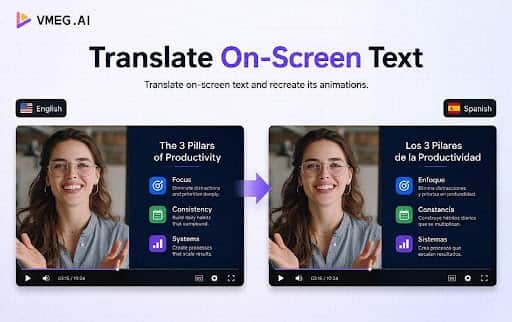
Beyond Dubbing: VMEG Now Translates On-Screen Text and Voice in Videos
Translating a video is not just about translating what the speaker says.
For e-learning teams and corporate trainers, much of the content is also inside the slides. Course titles, bullet points, diagrams, labels, screenshots, and on-screen instructions can carry just as much information as the speaker's voice.
If the speaker is dubbed into Spanish but the slides are still in English, the video is only partially localized.
VMEG Visual Translation is designed to solve this gap.
With the new workflow, VMEG can translate the speaker's voice and the text embedded in the video. The translated text is rebuilt in the video while the voice can be dubbed into the target language with AI voices, voice cloning, and lip sync.
The goal is simple: localize the whole training video, not just the audio.
Why Dubbing and Subtitles Leave Part of a Video Untranslated
Speech-to-text and machine translation have made the first part of video localization relatively straightforward. An automatic speech recognition system can convert spoken audio into a timestamped transcript, and a translation model can turn that transcript into another language. Text-to-speech or voice cloning can then generate the target-language audio.
None of those steps can see text that has already been rendered into the video.
That text is effectively a second document.
It can include burned-in captions, lower thirds, titles, chapter cards, slide headings, UI strings, chart labels, diagrams, and callouts. In a software tutorial, the interface itself may contain dozens of words that are never spoken aloud.
If the voice is Spanish, but the instruction on screen is still English. The viewer has to translate the interface mentally or guess which control the narrator is referring to.
That distinction matters even more in e-learning and training content. If the text on a slide is part of the lesson, leaving it untranslated is not simply a visual inconsistency. It means part of the instructional content remains in the source language.
This is why we think video localization has two distinct channels that need to be handled together:
The audio channel: what viewers hear.
The visual text channel: what viewers read inside the video.
A complete localization workflow needs both.
What Makes Visual Translation Different From Subtitle Translation?
The key difference is where the text exists.
A subtitle is a separate layer that can be edited, moved, hidden, or replaced. Burned-in text is part of the image itself. Once it has been rendered into an MP4, there is no text object waiting to be translated. There are only pixels.
That changes the entire workflow.
A visual translator has to solve something closer to an image reconstruction problem:
Find the text → recognize the characters → translate the text → remove the source pixels → reconstruct the background → render the translated text → preserve timing and motion.
A useful visual translation system therefore has to combine several capabilities that are usually treated as separate computer vision or localization tasks.
The first is text detection. The system needs to determine which areas of the frame contain text and which areas should be left untouched.
The second is OCR. Once a region is detected, the system needs to turn those pixels into editable characters.
The third is translation. The recognized text needs to be translated using the correct language pair and, ideally, the same terminology and glossary used for the spoken translation.
The fourth is text removal. The original characters need to disappear without leaving an obvious hole in the image.
The fifth is reconstruction. The translated text needs to be rendered back into the video with a visual treatment that matches the source.
And because this is video rather than a static image, all of those operations have to remain stable across time.
Translation Needs Shared Context With the Voice
Once the source text has been recognized, the next step is translation.
Short on-screen strings can actually be more sensitive than long sentences. A product name, feature label, button, legal line, or course title may have to fit into a very specific visual space.
The translated text should also use the same terminology as the spoken translation.
A shared glossary can prevent that mismatch.
There is also a layout problem.
Translation changes length.
English text may expand substantially in German, Spanish, French, or other languages. A heading that fits comfortably inside a 300-pixel box in English may overflow that same box after translation.
A visual translator therefore cannot simply replace one string with another and assume the job is finished. It needs to consider wrapping, font scaling, alignment, and positioning. In some cases, the best solution is a shorter human-approved translation rather than shrinking the type until it becomes unreadable.
This is one reason visual translation is not just an OCR feature. It is a combination of language processing and visual layout.
One Video Localization Workflow
The main idea behind VMEG Visual Translation is not to create another standalone OCR tool.
It is to bring visual translation into the same workflow as video translation.
A training team should not have to manage one tool for dubbing, another tool for subtitles, and a separate video editor for translating every slide.
With VMEG, the workflow brings together:
Voice → transcription → translation → dubbing → voice cloning → lip sync
and
Slides → OCR → translation → text replacement → visual reconstruction
The result is a localized training video in which the instructor and the learning material speak the same language.
Built for Real-World Training Content
Not every piece of text in a video should be changed.
Logos, trademarks, product names, and complex graphics may require human review. Long translations can also require adjustments when the target language takes more space than the original.
That is why VMEG includes an editing and review stage rather than treating localization as a completely hands-off process.
The goal is to automate the repetitive work while giving teams control over the final video.
For e-learning teams, training departments, and course creators, the result is a more complete localization workflow:
Translate the speaker. Translate the slides. Keep them synchronized.
That is what VMEG Visual Translation is built to do.


-
1Automating repetitive tasks in video content production is a huge win for efficiency, and it sounds like VMEG is addressing a real pain point with voice and on-screen text translation. I can relate to the struggle of streamlining content processes. When I started working on my own project, I faced challenges with creating engaging and optimized blog content while juggling tight deadlines. One key takeaway from my experience is to focus on how automation can save time and drive consistency, much like what you're doing with video. We implemented some automation in our content creation workflow, which reduced our publishing time by about 40%. I also found that by integrating tools that could score and optimize the content we produced, we could enhance our visibility online, which ultimately increased our organic traffic by around 60% in just a few months. It’s crucial to maintain control despite automation. Giving teams the ability to tweak and customize outputs can lead to more polished results. It seems like VMEG is on the right path by balancing automation with user control. I'm excited to see how it develops and what impact it has on the workflow of content teams. Keep iterating and addressing user feedback it's invaluable!a day ago Reply
