Building TinyTask Pro: Reimagining a Windows Automation Tool That Stopped Evolving
Hi everyone,
I've spent the last several months rebuilding a lightweight Windows automation tool called TinyTask Pro, inspired by the simplicity that made macro recorders popular years ago.
The original concept was straightforward: press Record, perform your actions, press Stop, and replay them later. That simplicity is what attracted so many users. But as Windows evolved and automation needs became more sophisticated, I noticed that many users wanted more without sacrificing the lightweight experience.
Instead of creating another complicated automation platform, I decided to explore a different direction: keeping automation approachable while adding practical features that modern users actually need.
Why I Started
My background is in SEO, web development, and software projects. Over time I found myself repeating the same small computer tasks dozens of times every day:
Opening the same applications
Filling repetitive forms
Clicking through identical workflows
Running repetitive browser actions
Managing routine office tasks
There are plenty of powerful automation tools available, but many require scripting knowledge or have a steeper learning curve than casual users want.
I kept asking myself:
What if automation could stay simple enough for anyone while still solving more advanced workflows?
That question became the foundation of TinyTask Pro.
What I've Been Building
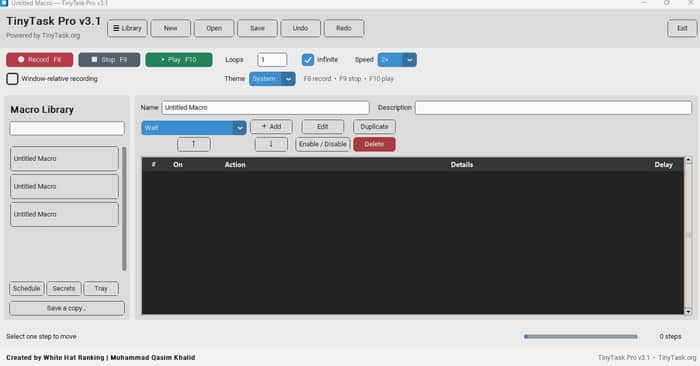
The desktop application focuses on maintaining the familiar record-and-play workflow while improving usability.
Current capabilities include:
Macro recording and playback
Adjustable playback speed
Loop execution
Save and load automation files
Emergency stop controls
Smooth playback mode
Cleaner interface designed for modern Windows
Rather than adding hundreds of options, I'm trying to keep every feature useful without overwhelming first-time users.
An Unexpected Direction
While working on desktop automation, another problem kept appearing.
Many people manually send personalized emails through Gmail every day:
Outreach
Sales
Recruitment
Client follow-ups
Customer communication
Most available solutions were either expensive, overly complex, or required cloud services.
That led me to build a second project alongside TinyTask Pro: a Chrome extension that helps automate Gmail workflows while staying within Gmail itself.
Features include:
Personalized email sending
Google Sheets integration
License management
Usage tracking
Daily sending limits
Local-first workflow with server-side licensing
Building both desktop software and browser extensions at the same time has been a completely different challenge compared to building websites.
Challenges So Far
Some of the biggest lessons weren't technical.
Software distribution is much harder than web development
Getting listed on software directories requires meeting security, packaging, signing, and review standards that many new developers underestimate.
Trust matters more than features
People naturally hesitate before downloading desktop software.
I've spent a significant amount of time improving:
Documentation
Checksums
Transparency
Product pages
Support resources
Public changelogs
Reviews and reputation
Building trust has become just as important as building features.
Distribution is a full-time job
Writing the software is only one part.
I've also been working on:
Documentation
Blog content
Tutorial articles
SEO
Software directory submissions
Community engagement
Product listings
User support
Marketing software has turned out to be almost as much work as developing it.
What Didn't Go as Planned
Not everything worked immediately.
Some software directories rejected early submissions because of packaging requirements.
I also learned that even small inconsistencies—such as naming, signing, or antivirus reputation—can delay approval.
Those setbacks pushed me to improve the product rather than simply resubmit it.
What I'm Learning
If I had to summarize the biggest lesson so far, it would be this:
Building software is only half the journey. Earning user trust, refining the product based on feedback, and consistently improving distribution often takes just as much effort.
It's a very different experience from launching a website or SaaS application, and it's taught me to think about software from the user's perspective rather than only the developer's.
What's Next
Some features I'm exploring include:
Global keyboard shortcuts
More precise mouse and keyboard actions
Better macro organization
Scheduling
Smarter waiting conditions
Improved playback accuracy
Enhanced import and export options
I'm trying to keep the application lightweight while gradually adding features that genuinely improve productivity.
I'd Love Your Feedback
If you've built desktop software, browser extensions, or productivity tools, I'd really like to hear:
How did you approach software distribution?
What helped you build trust with early users?
Which marketing channels produced your first meaningful traction?
What would you prioritize next if you were in my position?
I'm always interested in learning from other builders.
Thanks for reading!
