How I built a privacy-first "all-in-one" workspace
Hi IndieHackers,
Like many of you, I have spent years trying to build the perfect productivity stack. At one point, my daily routine required jumping between four different apps: a calendar for meetings, a dedicated shift planner, a separate to-do list for tasks, and a habit tracker to keep my routines in check.
Not only was it exhausting to keep them all in sync, but the context switching was ruining my focus. Most solutions out there are either too bloated, riddled with ads, or tracking way too much user data.
So, I decided to scratch my own itch and build Oria.
What is Oria?
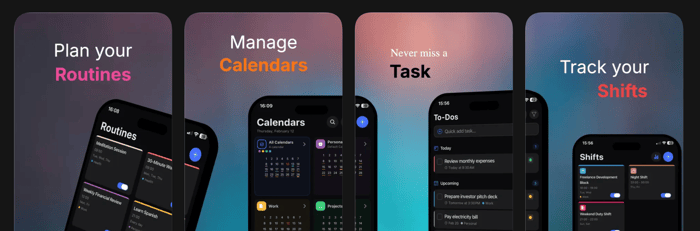
Oria is a complete, minimalist planning system designed to bring structure and clarity back to your day without the noise. Instead of forcing you into multiple subscriptions, it unifies four essential tools into a single, seamless workspace:
Calendar: A clean, multi-calendar view to see your entire life, work, personal plans, and deadlines at a glance.
To-Do Manager: Structured task lists to move from intention to action with zero clutter.
Routine & Habit Planner: Track daily habits, morning rituals, or study sessions directly connected to your schedule.
Shift Planner: Built for real-world, rotating schedules, making it a great fit for freelancers, healthcare workers, or anyone with non-traditional hours.
Built with a Privacy-First Mindset
As an indie maker, I believe your time and data belong to you. That is why Oria is built on a few core principles:
Zero Ads and Zero Tracking: No third-party data collection.
Full iCloud Sync: Your data stays securely inside your own Apple ecosystem.
Distraction-Free UI: A modern, minimalist aesthetic inspired by high-quality design languages to keep you focused.
It is Free to Try – and I Need Your Feedback
Oria is officially live on the App Store, and it is free to download and try out.
You can find it here: Oria
As indie hackers, you have the sharpest eyes for UX, onboarding flows, and product design. I would absolutely love to get your honest feedback:
How does the onboarding feel? Does the value proposition click right away?
For those with rotating shifts or complex routines, does the app structure adapt well to your workflow?
What is the one feature missing that would make Oria your permanent daily driver?
Looking forward to hearing your thoughts, feature requests, or even your brutal critiques. Let us chat in the comments.
Best

The privacy-first approach is probably the most interesting part of this for me, especially now that so many productivity products are moving in the opposite direction and collecting more context in order to add AI features.
The design challenge is that privacy is largely invisible. Users can immediately see a clean interface or an integrated calendar, but they cannot see that their data never leaves their Apple ecosystem. I would make that architecture part of the onboarding and product experience rather than leaving it only as a promise in the App Store description.
I would also be careful with the “all-in-one” positioning. Combining four tools is useful only when they share one coherent model. The real opportunity is not simply having tasks, habits, shifts and calendar events in the same app, but helping users understand how they affect one another without creating more planning work.
For example, could a rotating shift automatically reshape someone’s routines and available task capacity for that day? That kind of connection would make Oria feel like one system rather than four tools placed together.
Strong foundation. I would be very interested to see how you communicate the privacy model without making the onboarding feel technical.