How I Built Excelmatic and Achieved 2072 Google Clicks in 28 Days
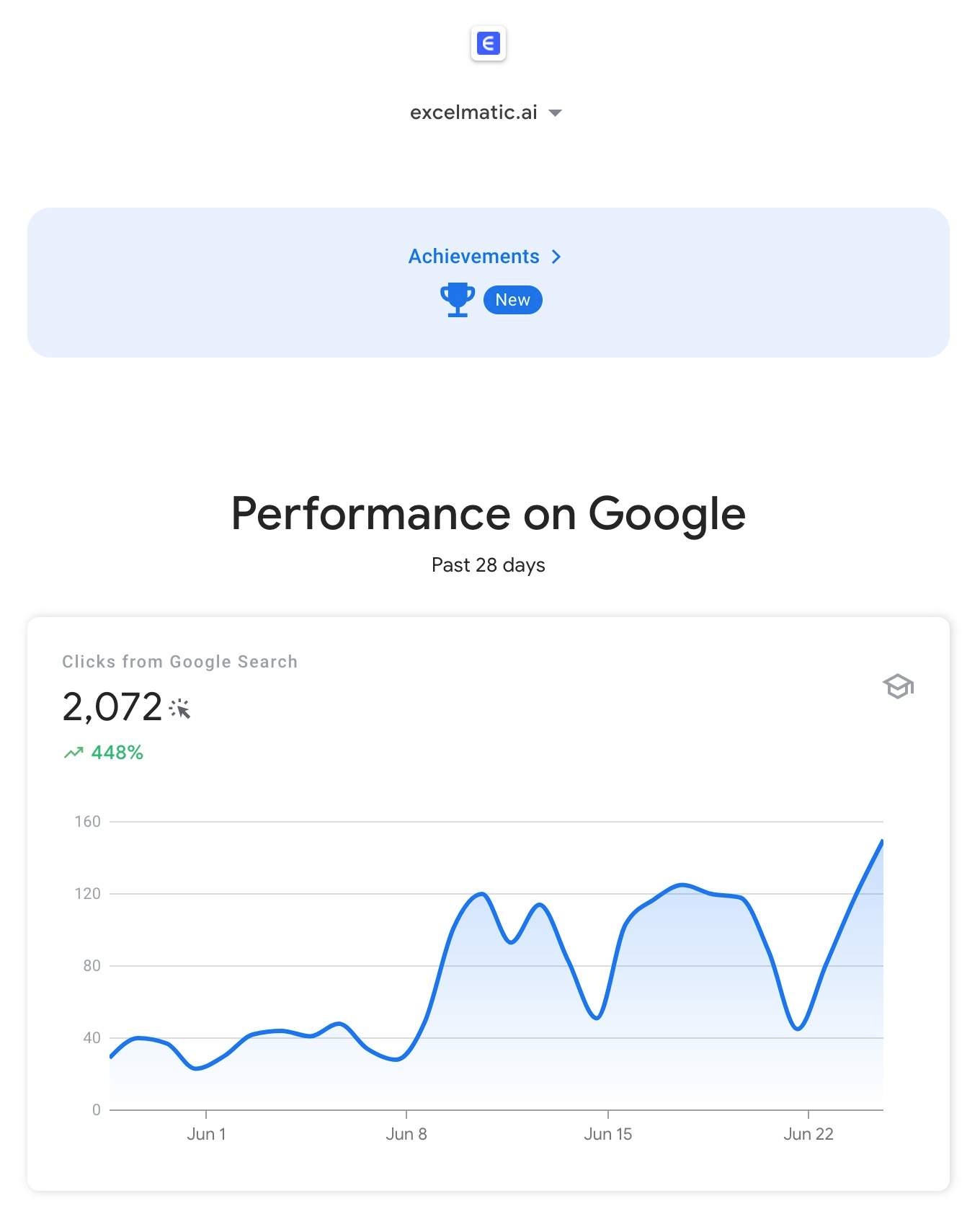
Hey IndieHackers! I’m pumped to share the story of building Excelmatic, an AI-powered tool that takes the headache out of Excel tasks. In just 28 days, we racked up 2072 Google clicks—here’s how we did it with a killer tech stack and a solid SEO game plan.
The Tech Stack: SvelteKit + Tailwind CSS
I wanted a site that’s lightning-fast and easy to scale, so I went with SvelteKit. This framework is a dream—server-side rendering (SSR) boosts SEO, and its compile-at-build-time approach keeps things snappy for users. The file-based routing also made it simple to set up our structure: four featured pages and tens of blog posts, each with categories and tags to keep everything organized.
For the look and feel, Tailwind CSS was my go-to. It’s utility-first, meaning I could whip up custom designs without drowning in CSS files. It sped up development and gave Excelmatic a clean, professional vibe. The tagged and categorized blog setup? That’s not just for users—it helps Google crawl our site better too.
The
SEO Strategy: Keyword is the Magic
To get those clicks, content had to hit the mark. I used some keyword tools like SEMRush to uncover keywords people are actually searching—like “how to automate Excel formulas” or “Excel data analysis tips.” These are real problems, and I knew Excelmatic could solve them.
For every keyword, I crafted blog posts with step-by-step guides showing how Excelmatic tackles those issues. Think detailed walkthroughs, screenshots, and practical tips—stuff that’s useful and keeps readers hooked. It’s all about solving problems while naturally weaving in those keywords for SEO juice.
Boosting Engagement and Navigation
After creating almost 10 blogs, I started adding more internal links to connect features and blog pages. Each blog now links to related content, guiding users through the site effortlessly. Plus, I added recommendation sections at the end of each blog, suggesting related posts to keep users engaged and encourage them to stick around and learn more.
I also created listing pages for tags and categories to help users explore topics they’re interested in. For each category and tag, I’ve built detailed pages packed with curated content, making it easy for users to find more on specific subjects.
Sitemaps and IndexNow: Getting Found Fast
The sitemap was a game-changer—I included all pages with their actual modification times so search engines know what’s fresh. And I didn’t stop there. Using the IndexNow API, I pinged Bing and other smaller search engines as soon as new content went live, ensuring it got indexed as quickly as possible.
Titles and Descriptions: The Click Magnet
For every piece of content, I crafted proper titles and descriptions—not too short, not too long, just right. These are crucial for convincing users to click when they see my content in search results. I made them clear, useful, and packed with value, giving people a solid reason to choose Excelmatic over the competition.
The Results
The payoff? 2072 Google clicks in 28 days! That’s a ton of people finding Excelmatic and seeing what it can do. It’s proof that pairing a smart tech stack with targeted content can drive serious traffic fast.
Going Global: Breaking Into New Markets
After nailing our English content and seeing those sweet SEO results, we thought, “Why stop there?” The English market for Excel AI tools is packed—it’s a red ocean out there, meaning fierce competition everywhere. To get more users, we decided to go international and added support for Korean, Spanish, Japanese, Portuguese, Chinese (Traditional), and German. And guess what? It worked like a charm. We’re now reaching users from all over the world, and our traffic is climbing even higher. If you’re an indie hacker looking to scale, don’t sleep on internationalization—it can open up a whole new world of opportunities.
What’s Next?
If you’re building something, don’t skip on your tech or SEO—it’s worth the effort. We’re just getting started with Excelmatic, so stay tuned for more.


Well, you have a GREAT process , progress , insight, and all !!
You can be a lifesaver for a lot of people !!
What a great progress
Thanks, hope my experience can inspire you.
What a great progress! Been checking with our company projects too, we somehow came up with something internal no-code for our next SaaS too. This is impressive!
Thank you. May be you can give Excelmatic a try, for in the near feature, Excelmatic will support custom data source and support native LLM model, like: download excelmatic, setup data source( Your own db, sqlite, MySQL, SQL Server ....), setup ollama with Deepseek, Qwen.., and then you can just talk to your data, make stunning charts, get instant insights.
This will come to true in few months.
Awesome progress! I'm thinking of using SvelteKit for my next SaaS.
And I'll bookmark this for my initial SEO plan! Simple, smart approach.
Thank you, hope this works for you.
I like how you validated this before building. What’s been your biggest challenge so far?
I build this because I need this tool too, and then I searched the internet, found that many users like me are try to find methods , tutorials on how to using excel to do the chart, do the analytics. There are solutions out there like PowerBI, R, Python, but they all need professional skills and long time to learn. So, I think this may be a good chance to do a product to help users, by using AI, we can help users solve their problem by just command the AI.
The biggest challenge currently I facing is the marketing, how to make it available to my users, let them know Excelmatic can solve their problems. Also there is a simple challenge that some times AI will not works well for complicated problems, but I think we will have a solution for this soon, then this will not be a problem.
Great article! How long did it take before your SEO efforts had impact?
not long, as the data from google search console, it takes less than two month.