I built SubPulse — a Chrome extension to track subscriptions before they renew
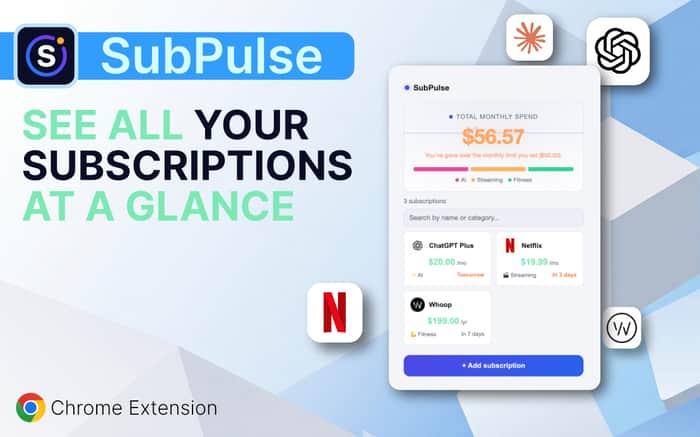
I built a privacy-first Chrome extension that helps people track recurring subscriptions, see their monthly spending and get reminded before renewals.
I built a Chrome extension because I kept forgetting about subscriptions
I kept running into the same annoying problem: subscriptions are incredibly easy to start and surprisingly easy to forget.
Netflix, Spotify, AI tools, software, gym memberships, SaaS products... individually they don't feel like much, but together they can quietly become a pretty significant monthly expense.
And the worst part is that you often don't realize it until the renewal charge has already happened.
So I built SubPulse.
👉 SubPulse: https://subpulseapp.netlify.app/
What does SubPulse do?
SubPulse is a Chrome extension for tracking recurring subscriptions and seeing exactly how much you're spending every month.
You manually add your subscriptions, and SubPulse gives you a simple dashboard showing:
- 💰 Your total monthly subscription spending
- 🔔 Upcoming renewal reminders
- 📊 Spending by category
- 💱 Multiple currencies with automatic conversion
- ⏸️ The ability to pause subscriptions without deleting them
- 👥 Shared subscription cost splitting
- 🎯 A monthly spending limit
- 🔎 Search and filtering
- 📅 Add subscriptions to your calendar
- 📈 Spending history and month-to-month comparisons
- 📁 CSV export
- 💾 Full JSON backup and restore
There's also a small badge on the Chrome icon showing when a subscription needs attention, so you don't even have to open the extension.
The thing I care about most: privacy
I didn't want to build another finance product that asks users to connect their bank account or hand over sensitive financial information.
SubPulse doesn't require an account or registration.
Your subscription data is stored locally in your browser.
There is no bank connection, no email scraping and no server storing your subscription list.
Free vs Pro
The free version supports up to 5 subscriptions, which is enough to try the extension and see whether it's useful for you.
The Pro version adds:
- Unlimited subscriptions
- Spending history charts
- Upcoming payments view
- CSV export
- Weekly spending summaries
- Additional Pro features
Pro is currently €2.99/month or €19.99/year.
I'm deliberately keeping the free version useful rather than turning it into a demo that immediately asks you to pay.
Why a Chrome extension?
I considered making this a web app, but there's something nice about having your subscription dashboard available directly in the browser.
Most of the things we're paying for every month are digital services anyway.
So instead of opening another website, creating another account and entering another password, you can just click the Chrome icon and see what you're paying for.
I'm still building this
SubPulse is an independent project and I'm actively improving it.
The current version includes things like automatic currency conversion, recurring calendar events, price-change detection, subscription pausing, undo after deletion, keyboard shortcuts and the renewal badge.
I'm especially interested in feedback from people who have a lot of recurring subscriptions.
What would you want a subscription tracker to do that SubPulse doesn't currently do?
And if you try it, I'd genuinely love to hear what you think — even if you don't like it.
👉 [Install SubPulse from the Chrome Web Store]: https://chromewebstore.google.com/detail/subpulse-—-rastreador-de/oilfoalnllbibcefadnollmchomhbple?hl=es&utm_source=ext_sidebar
Thanks for checking it out!

The privacy-first angle is the strongest differentiator. The bigger question is whether manual subscription entry creates enough ongoing value for users to keep the extension installed and pay beyond the initial setup.
That's a really fair question. I think the key is making SubPulse useful beyond the initial setup.
The initial entry is manual, but after that the value is in the ongoing reminders, upcoming payments, spending history, price-change tracking, monthly budget monitoring and notifications.
I'm also intentionally keeping the manual approach because I don't want users to connect their bank account or give an extension access to their financial data just to track subscriptions.
I'm still very early, so retention is actually one of the things I'm most interested in validating. If users consistently stop opening it after the initial setup, that's probably the first thing I'd need to improve.
Thanks for pointing this out — it's exactly the kind of thing I need to test with real users.
That makes sense. I’d be most curious whether users come back because of the reminders themselves or because they actively use the spending/history side between renewals.
That's actually a really good distinction. I suspect the reminders will be the main reason users initially come back, while the spending/history side could be what makes it useful between renewals.
I'm going to start tracking that more closely now that I have the first users. For example, whether people return around renewal dates versus opening it proactively to check their spending.
If the data shows that people only come back when a subscription is about to renew, that would probably tell me I need to make the spending side more useful on a day-to-day or weekly basis.
Appreciate the question — this is exactly the kind of retention behavior I hadn't thought about measuring separately.
That’s an interesting distinction. I’d be interested in continuing the conversation outside the thread if you’re open to it. What’s the best email to reach you at?
Absolutely, happy to continue the conversation. You can reach me at josemicg25@gmail.com - Thanks for reaching out!
Thanks! I’ve just sent it over.
Looking forward to hearing your thoughts whenever you have a chance.