I couldn't afford attendance software for my team, so I built one and made it free for others
A while back I needed a proper attendance and leave system for my own company. Everything I looked at either charged per employee or locked reporting and exports behind a higher tier. For a small team, that adds up fast.
So, I built it myself, used it internally, and kept polishing it once it was working well. Eventually I decided to put actual time into it and open it up for other teams in the same spot.

It's called Clocked Live. Free for up to 20 employees, full feature set, no time limit:
Check in, check out, and log breaks in one tap
Leave requests with one-click approval
Live dashboard instead of asking "is anyone online"
Geo-fenced check-ins, configurable grace periods per employee
CSV/Excel exports for payroll, audit log on every manual edit
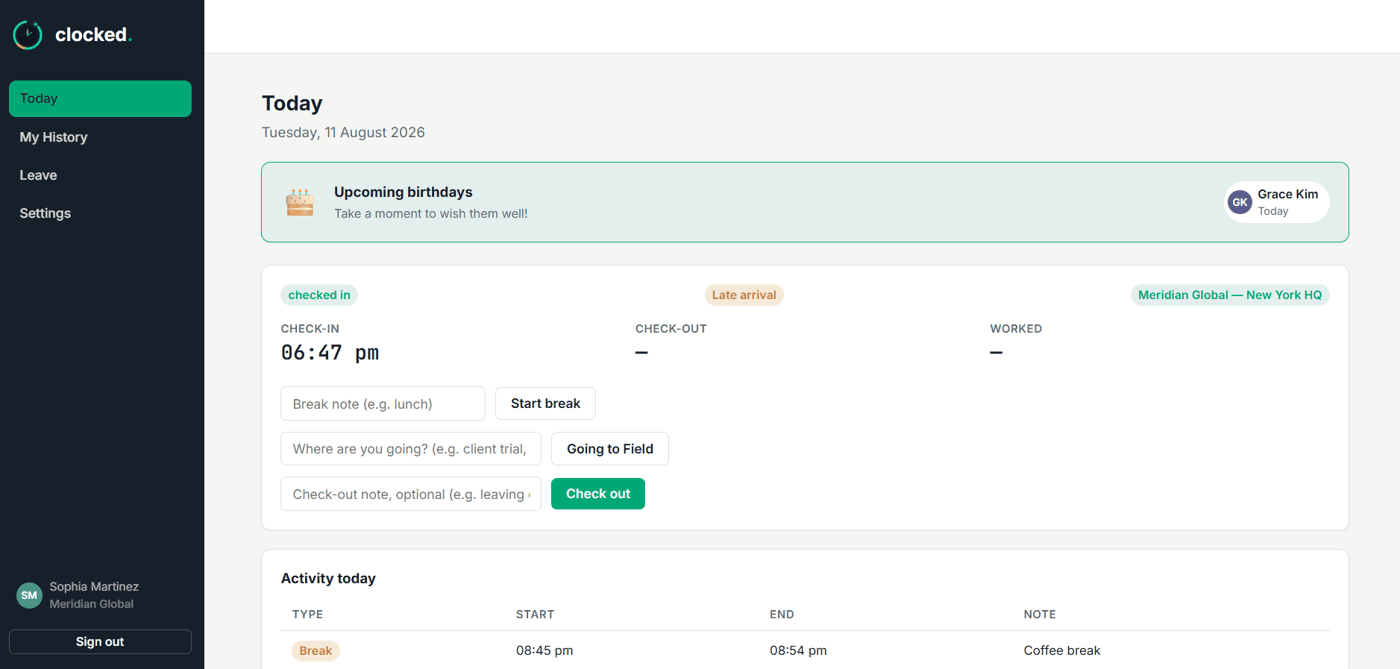
It's free for 20 employees and past 20 employees it's $19/month flat, up to 500 people, no per-seat charges.
Stack, if anyone's curious: React/Vite frontend, Express/Node backend, Supabase for the database and auth, Socket.io for the live dashboard, Polar.sh handling billing.
If you're running a small team or startup and you've been putting off getting proper attendance tracking because of cost, this is exactly who I built it for.
Feedback very welcome.


The “built it for my own team first” angle really stands out. The real-time visibility and audit trail seem especially valuable because attendance tools often become useful only after something goes wrong. I’m curious about the mobile experience here are employees and managers able to handle check-ins, breaks, leave requests and approvals seamlessly from mobile, or is that something you’re still improving?
Admin and Employee dashboard can be installed on mobiles (Android/iOS). App is PWA which is a beautiful part by the way. HR Admins get to receive live notifications right on their mobile devices.
Really thoughtful product I noticed a few UX opportunities.
Offline check-ins: a clear Saved to Syncing to Synced state would build trust.
“Late arrival” could show the scheduled time + exact minutes late.
Live roster could show duration / last updated alongside each status.
Geo-fence errors could explain why the check-in was blocked and what to do next.
Mobile/PWA could make reconnect and action states more explicit.
Small interaction improvements like these can make daily use feel much more polished.
Curious which of these are already on your roadmap?
Really appreciate the depth here. Honest answer: none of these are formally on a roadmap yet, but they're the most concrete UX list I've gotten, so that's changing now.
Offline states today are just a raw "N queued" count (no per-item Saved/Syncing/Synced), late is a plain badge with no time detail, and the live roster shows status + clock time but no duration. Geo-fence is actually more lenient than you'd guess, it doesn't block check-ins, just flags them "off location" after the fact, but your framing (explain why + what to do) is better than what I have.
Offline states and reconnect feedback are cheap, doing those first. Late-arrival detail and roster duration need a small backend change first. Thanks for this.
Glad the feedback was useful. I think the product foundation is already strong the real opportunity now is making every user action feel completely clear and trustworthy. Offline sync, reconnect states, late-arrival context, and roster duration may look like small details, but these are exactly the moments that shape how users trust a system. You’ve already solved the core problem refining these interaction details could take the overall experience to another level. I’ll be genuinely interested to see how you evolve these in the next iteration.
Tayyaba, I worked on your feedback right away. It is live and system updated the current clients about it. They love it. Thank you so much for such a great input that improved the product. This is the power of tech community and its feedback!!
Would love to connect and discuss. You can email me at heyshahrukh@outlook .com
Absolutely. I’ve just sent you an email with a few additional observations and practical recommendations for Clocked. Looking forward to continuing the discussion and exploring what could make the product even stronger.
Thanks for wonderful feedback. Let's stay connected!
The fact that you built it for your own team first makes this much more interesting than starting from a feature list.
I'm curious which part of the original attendance workflow caused you the most frustration before you decided to build Clocked Live.
Honestly, real-time visibility was the killer. We were using thumb machine for attendance and it worked fine as a system of record but on any given morning I had no idea who was actually in, who was running late, or who was still on a break, without physically checking or pinging someone. It was always retroactive: you'd find out at end-of-day reporting time, which is useless when you actually need to make a call right now.
The second thing that really got to me was editing attendance. Someone forgets to check in, or checks in from the wrong place, and fixing it was a total black box. You'd just overwrite the record with no trace of who changed what or why. No accountability, and no way to trust the data six months later.
And honestly, part of it was just that every tool that did this properly wanted enterprise pricing for what felt like table-stakes features. So Clocked Live started as "fix this for my own team", live status instead of end-of-day reports, and every manual edit gets logged with a reason attached, and it grew from there.
That’s a much stronger origin story than “I saw a gap in the market.” The real-time visibility piece sounds especially tied to an actual operational pain. I’d be interested to hear how that translated once other teams started using it — what’s the best email to reach you at?
Would love to connect. You can email me at heyshahrukh@outlook .com
Thanks! I’ve just sent it over.
Looking forward to hearing your thoughts whenever you have a chance.