Meeting done, recording saved. Seconds later, Claire has pulled out everything that matters.
Hey everyone, Karsten here. Solo founder of Claire, an AI-first project management tool. I'll try to describe it without the landing page voice.
The short version: every PM tool waits for you. You keep the board current, you set the priorities, you notice what slips. Claire doesn't wait. It schedules tasks into the free space in your week, suggests priorities, and flags problems before you see them. And when you want to know something, you ask the board.
-
That last part is what I use most. In the morning I ask the board what needs attention. It reads everything and answers in a couple of seconds: one deadline is tight, one task got five new comments overnight, here are the links. That replaced my scrolling and most of my status checking.
-
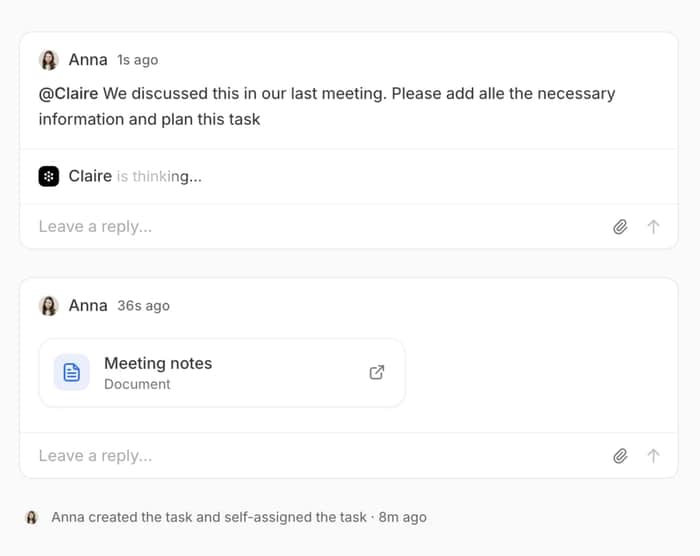
Second thing: agents live inside tasks. You mention them like a coworker. "@Claire, summarise this comment thread into the task description." "@Klaviyo, check the welcome flows." The answer lands in the thread, visible for the whole team. You can build your own agents for the tools you use.
-
Third: Radar. It runs without being asked. The kind of thing it catches: the newsletter is scheduled for Thursday, but the pricing it announces is still being discussed in another project. It flags that, suggests the next step, you approve or dismiss.
-
Fourth: documents. Meeting notes get written for you, linked to the tasks they belong to, and the action items turn into tasks on the board. Claire creates other documents the same way, briefs, specs, whatever the work needs. Nothing gets lost between call and board.
-
The rest in one sentence: tasks land in the calendar you already use (iCloud, Google, Outlook), Claire reads your calendars back so it plans work into time that actually exists, and it writes meeting notes and drafts replies.
The core underneath all of this is memory. Claire keeps a user memory and a board memory: it analyses the conversations, understands what you work on and where your focus is, and stores the base information everything else draws from. That's why answers come without briefing and why Radar can connect things across projects. Without that layer, this would just be a chatbot sitting on a kanban board.
Where it honestly stands: the web app is live. The iOS app is about to hit the App Store, but it's a companion for now, chat, tasks and push.
On pricing, because it always comes up: no subscription, no seats. People, projects and tasks cost nothing. You pay for agent runs, because those cost me actual money every time one fires.
Usage shows up day by day, per agent, and you can put your own API key on a board if you'd rather run it on that. The uncomfortable part as a solo founder: if the AI does nothing useful for you, I earn nothing.
The honest problem with this post: Claire does a lot more by now than fits in here, and it takes a ridiculous amount of work off me every day. I know how that sounds. Every AI founder says it. So I'll skip the convincing and just leave the link: https://www.weclaire.com, no card needed. Try it, form your own opinion.
Apps for Mac and Windows: https://weclaire.com/download
iOS app (currently not available in the EU, approval from Apple is still pending, but it shouldn't be long now)

The strongest part is that memory appears to be the layer connecting the features. Without that, the product would look like a collection of AI features; with it, the workflow becomes much more coherent.
Hmm, I really tried to highlight the benefits of the features. That's an interesting thought you have, really interesting.
That’s fair. I’d be curious whether users independently describe the memory layer that way after using it for a while.
One thing users do notice immediately: Claire picks up context much faster than ChatGPT or Claude. Whether they'd call it a 'memory layer' themselves, probably not. But they feel the effect.
That’s a useful distinction — users feeling the effect matters more than whether they use the same terminology. Would you be open to sharing the best email to reach you on?
This comment was deleted 11 days ago