Open low-code frontend tool (asking for feedback)
Hi everyone,
I'd like your feedback on an interactive landing page about, and built with a low-code frontend tool:
I wanted to try something non-techy. The target audience is not other frontend developers, but the people who frontenders work with - designers, copy writers, product owners, analysts, backenders. Great product ideas can come from all directions, so it's better if more people don't have to look at code, but can look at it in a more approachable editor.
And for the techy people: It's similar to node-red, but works with React/Redux and linked data (experimentally)

I'm sorry, I'm also really confused what this tool is for. Are users going to build a website? Make small tools for personal use? A collaboration tool to use with designers?
Overall, this website is way too techy for your stated audience. The name metaexplorer doesn't tell me what the product is or appeal to a non-techy audience. And "wrap your little helpers" barely makes sense to me as a frontend developer. (Side note, in the US, "little helper" has a bit of a drug association: https://io9.gizmodo.com/this-is-the-drug-in-the-rolling-stones-song-mothers-li-1693032181)
The design and performance of the site aren't doing you any favors. The site feels really slow, which makes me feel like whatever I build will be slow. And the design of the page is kind of strange. For example the justified headings, the "Land" tab, and the text over the illustrations.
Anyway, I agree, you probably made something cool, but it's hard to tell right now.
oh wow, that's a spooky side note! Glad I didn't use a dark theme with this level of ambiguity :)
Let's say we were on a product team, I'd want a copywriter to be able to commit their change to "Land", a designer to move the text away from the illustrations, and the PM to A/B-test "little helper"-alternatives - without us having to touch code (There would still be the performance issue... ;) ).
In my experience less techy people on product teams have a strong interest in what gets built and are often closer to the user than the developers. I've heard a lot of frontenders say they want the full flexibility of using code, and that they might loose that flexibility with low-code. But the one who actually needs the flexibility to modify/experiment is the team member who just came from a call with a client. That's where the idea of targeting team members and enabling them to create frontends comes from.
The low-code editor itself is at a Proof of Concept-level right now. The main "proof" was that an interactive page could be built with it --> the landing page. For the stable version performance is a top priority, and now I'm trying to figure out who could be most interested ...(and how to reach them without sounding like a drug dealer) :)
you lost me at "Wrap your little helpers".
This is obscure, I literally opened the website and as the page loaded slowly I was wondering, what on earth is a little helper?
I am sure the product is really neat but I am not sure it's clear from your page what you're exactly selling?
Thanks, that's really useful feedback, and it's good to know that "little helper" doesn't stick.
I wanted to let other people use and change whatever I'm building as a frontend-developer, without them having to learn how to code. So when I build some UI element to display text or images, a copywriter or designer should be able to modify its content. When the UI element can also change something, like a text input, then where the changed value lands should be modifiable without code as well. And lastly, when you've built something pretty useful you want to reuse it - so you can use "ImageWithTextInput" just like any other UI element before.
Some stuff is not visual, like the mailto-formatter in this image, but they can be similarly connected and used to produce the "mailto-form" in the end:
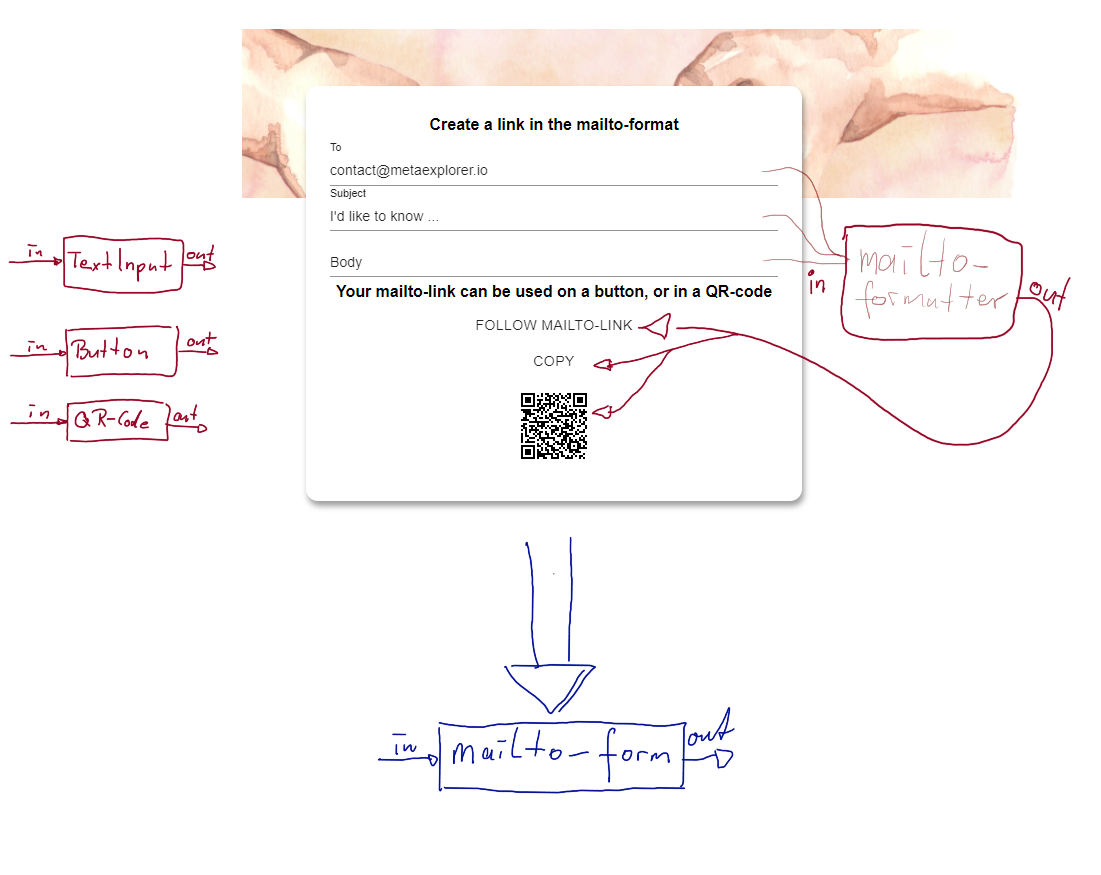
Does this make it a little clearer? I'd be really glad about feedback!