This is the Most iOS design kit ever made by humans
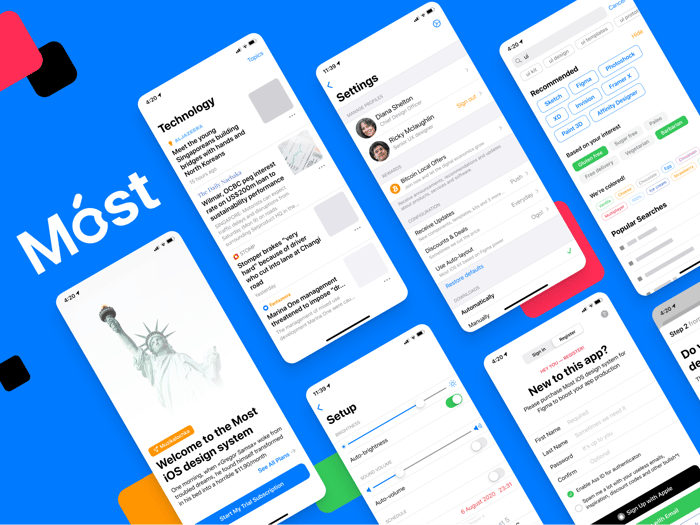
Now build an iOS app in just 3 days!
We finally did it — Most iOS design system contains every component in Figma to let you design a beautiful and native iOS apps in just 3 days. No design skills are required. We prepared, named, and organized every UI item to save your time and costs on apps production.
Learn more · Preview templates · ⚡ Open in Figma
Highlights of Most iOS library
- 200% compliance with native iOS Human Interface Guidelines by Apple. We've studied hundreds of iPhone apps to fit every pixel and sync every indent in each template we've included.
- Ready to use native Figma templates for iOS 13 apps design. Layouts are easy to customize and powered by auto-layout.
- You'll save time and reduce the app production costs because this design kit contains everything: Components, Templates, Patterns, Icons and delivers a lot of ideas to build cool apps.
- This iOS kit is components-driven and organized well. Each component comes with resizing constraints set correctly. Apple SF Symbols were integrated into this library.
What you'll get
- 600+ components organized and served to speed-up the prototyping mission for any kind of mobile products.
- 600+ iOS app templates configured for the latest iPhones at 414dp width and categorized into light & dark themes.
- We got everything is covered! Header & Footer bars, Buttons & Chips, Segmented tabs, Lists & Table view, Inputs, Popovers, Calendars and total 14 categories of native iOS components.
For serious scrollers, who reached the end of this post we've prepared a secret 25% off code PIZDEC25. Simply apply it during the purchase flow in Gumroad
Any feedback is appreciated!

I think you’re conflating app design and app development. Designing mockups is usually not referred to as “building” or “developing” an app. Just giving a heads up as it may reduce confusion in your sales page and reduce the possibly of novice customers who think they can make an app with your product.
Looks nice though!
Got it! Thanks. I've made some fixes. Is it OK now?
Yea it’s better except I’m still a bit confused by what this means: