
Atina AI
Embeddable AI agents for training and support

If you're evaluating AI support tools for your SaaS product, Intercom's Fin is probably on your shortlist — it's the category leader. But "category leader" doesn't always mean "right fit," especially if what you actually want is something that feels less like a support ticket and more like a real interaction. Here's an honest comparison.
Quick summary
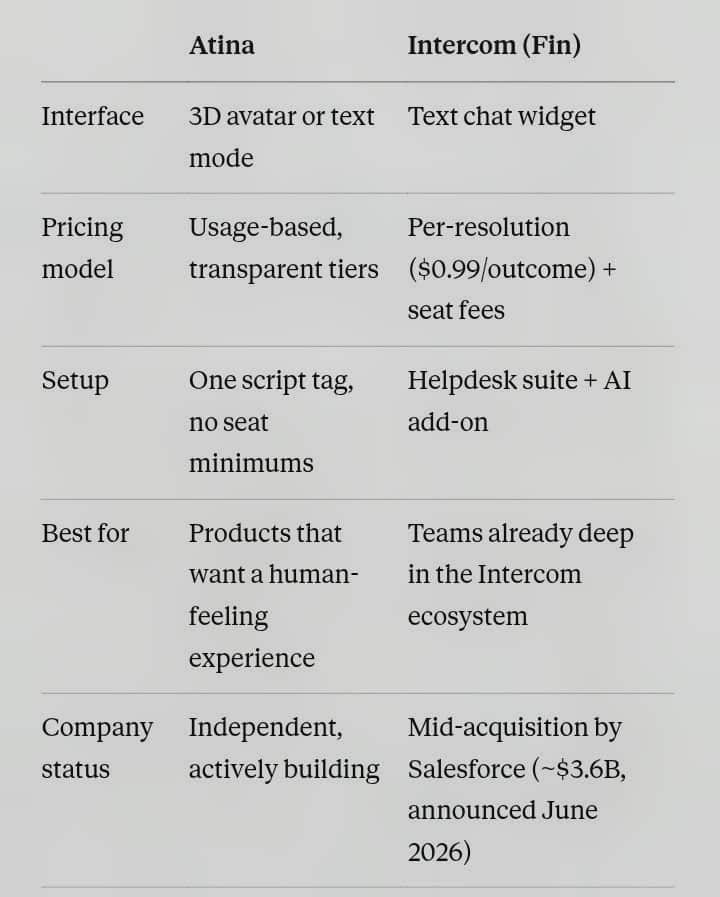
The core difference: a face, not a bubble
Every mainstream support widget — Intercom, Drift, Crisp — looks the same: a rounded chat bubble in the bottom-right corner. It works, but it's impersonal by design. Atina takes a different approach: a responsive 3D avatar that talks with your users, alongside a standard text mode when that's what fits better. If part of your product's value is feeling approachable, human, and present — not just "resolved" — the interface itself is doing different work.
Intercom's Fin, on the other hand, is built for scale and depth. It's genuinely strong at retrieval, multi-channel reach, and workflow automation. If your team is already living inside Intercom's helpdesk, Fin is a reasonable extension of a tool you already use.
Pricing: what you're actually signing up for
Intercom's Fin pricing is usage-based and, to its credit, transparent about the headline number: $0.99 per resolution, with a monthly minimum. In practice, though, teams evaluating it need to account for several moving pieces together — seat costs on top of the AI fee, a minimum resolution commitment, and the fact that real-world resolution rates typically land in the 42-50% range, which affects how you forecast your actual bill. None of that makes Fin a bad tool — it makes it a tool that rewards careful modeling before you commit.
Atina's pricing is built around simple usage-based tiers without a resolution-counting layer stacked on top of a separate seat fee — see the current plans on our pricing page for exact numbers. If part of your frustration with existing tools is unpredictable billing, that's worth a direct comparison.
Worth knowing: Intercom is mid-acquisition
As of mid-2026, Intercom renamed its parent company to Fin, and Salesforce has signed a deal to acquire it for roughly $3.6 billion — a deal that's signed but not yet closed. That's not necessarily a red flag, but it is a real variable: pricing, roadmap, and product direction can shift once an acquisition like this closes. If stability and an independent roadmap matter to your decision, it's a fair thing to weigh right now, not a hypothetical.
Who should choose which
Choose Fin if: you're already deep in Intercom's helpdesk ecosystem, you need mature multi-channel support (including voice), and you're comfortable modeling a usage-based bill that scales with resolutions.
Choose Atina if: you want your support/onboarding experience to feel less like a form and more like a conversation, you'd rather avoid stacking per-resolution fees on top of seat costs, or you want an independent company actively building rather than mid-acquisition.
Try it yourself
We're currently offering free 30-day embed access to the first 20 SaaS founders who want to try Atina on their own product — no card required. Get in touch to claim a spot or use coupon code: EARLYEMBED to activate developer plan.
Sources on Intercom/Fin pricing and the Salesforce acquisition are publicly documented as of mid-2026; always verify current pricing directly on Intercom's site before making a purchasing decision.

Hey IH, first post here, so a quick intro.
I'm a full-stack/AI engineer who's spent years building software for businesses and individuals. A few months ago I started Atina, an embeddable AI assistant for SaaS products, think Intercom or Drift, but instead of a text bubble in the corner, users talk to a responsive 3D humanlike avatar. Voice, text, and avatar mode, all embeddable with one script tag.
The idea came from noticing that even with the rise of Gen AI and agents, automated support systems and bots still feel cold, deliver a bad user experience, and aren't production-ready for the real world.
Atina exists to fix that gap. We're building an experience where users feel like they're talking to a real human — in avatar or text mode — while getting their issues solved. I'm not building just a support system, I'm building an AI employee for the full user experience, 24/7.
Where things stand:
Live product, subscription-based pricing, working SDK
Applied to YC to scale this faster, currently waiting to hear back.
Great at technical building, genuinely bad at marketing/distribution - which is why I'm here
I'm offering free 30-day access to the embeddable widget (normally a paid tier) to the first 20 SaaS founders who want to try it on their product. No strings - just want real feedback and, if you like it, permission to feature you as an early user.
If that's interesting, comment or DM me. Also happy to answer anything about the build — 3D avatar rendering, embedding architecture, whatever's useful.
-
1
Embedded AI assistants can become part of a customer’s core workflow quite quickly.
How are you planning to communicate model changes, widget updates, maintenance, or service incidents to teams using Atina AI? Are you considering release notes, email updates, or a public changelog and status page?
-
1
Thanks, I will say release notes and email updates. We have an advance emailing system which we uses for providing regular updates to our users/subscribers. We also have Atina Labs where we provide comprehensive and technical details of our model work, benchmark decisions, release notes, embedded assistant architecture, etc, and the infrastructure choices behind our reliable AI assistants.
Check out Atina Labs here
-
1
That sounds like a good split for planned communication.
Release notes and email updates cover most product changes, while Atina Labs gives technical users a deeper view into the model and infrastructure decisions.
The remaining case I’m curious about is real-time operational communication. If the widget or model service is temporarily unavailable, where would customers check for the current status and ongoing updates? Do you already have a public status or incident channel for that?
-
1
Not yet, but I will consider a better way to integrate that.
Meanwhile, to avoid service unavailability issues, we design model auto switcher into our micro service, in case a model is unavailable it switch to another, we tracks their performance records to choose the best stable one to handle request and penalize the failed/unavailable one to rest for some minutes.
We also have a support channel where we listen to users issue, either they self serve their self through other available options or open a ticket. We have in-house custom built miniLM (ICL-1) for other purposes like intent classification, they handle the user request properly.
-
1
That’s a thoughtful resilience layer. Automatic model switching should prevent many provider-specific failures from becoming visible outages, and tracking stability over time is a sensible way to choose the fallback.
I’d still treat resilience and incident communication as separate responsibilities, though. Failover may succeed while response quality or latency degrades, and there are also failures outside the model layer — routing, authentication, the embedded widget, or the support service itself.
If the fallback system can’t fully recover, or users begin seeing degraded responses, how would you proactively tell affected customers before they need to open a support ticket?
-
1
I guess that should be the next thing on my list. Based on your experience, how did you recommend me tackling this?
-
1
I’d start deliberately small rather than building a full incident-management system.
First, define the conditions that count as customer-visible degradation — for example:
all model providers unavailable
fallback latency above an acceptable threshold
response quality falling below your confidence threshold
authentication, routing, or widget delivery failures
Then create one incident record as the source of truth, with a very small first-update format:
affected capability
current severity
what is still working
one factual sentence
next update time
That same incident should feed an independently hosted status page and, where possible, a lightweight message inside the widget. For higher-impact incidents, email affected customers as well.
I would keep the first version manually approved. Your monitoring can prepare the incident draft when thresholds are crossed, but a person should confirm the audience and wording before it publishes. Once the process proves reliable, you can automate more of it.
The important part is that users should not need to open a support ticket just to discover that you already know about the problem.
-
1
This is a very awesome idea, thank you. I will surely consider it.
-
-
-
-
-
-

Comment