
Doxy
Turn Google Docs into your PDF automation powerhouse
Hey Indie Hackers!
Excited to share another update to Doxy - our tool that turns Google Docs templates into automated PDF generators. Just a few weeks ago, we launched conditional rendering, and today, we're taking it up a notch with a feature many of you have asked for: else statements.
The Problem (and Our Solution)
Previously, conditional rendering in Doxy allowed you to show or hide sections of your document based on a boolean variable . This was great for many scenarios, but what if you wanted to display alternative content when a condition wasn't met? That's where the new else functionality comes in.
How It Works
We've kept the syntax intuitive and consistent with the existing conditional rendering:
#if:isPremium# Welcome to our premium service! You have access to all features. #else:isPremium# Consider upgrading to our premium plan for additional benefits. #endif:isPremium#
As you can see:
• When isPremium is true, the first message is shown.
• When `isPremium` is false, the content after #else:isPremium# is displayed instead.
• The #else statement must use the same variable name as its corresponding #if statement .
Why This Matters (The Benefits)
This seemingly small addition unlocks significant flexibility:
• Provide Alternatives, Not Just Omissions: Instead of having blank spaces when a condition is false, you can now present relevant alternative information.
• Streamlined Templates: Create more versatile templates that can handle multiple scenarios within a single document.
• Enhanced User Experience: Deliver more personalized content that speaks directly to each recipient's specific situation.
• Reduced Template Maintenance: You might be able to consolidate different template variations into a single, more dynamic one.
Real-World Use Cases
The possibilities are vast! Here are a few examples:
• Pricing Communications
• Membership Status
• Regional Content
• Payment Status
Try It Out!
The else functionality is live right now for all Doxy users. Simply update your Google Docs templates with the new syntax, and you can immediately start taking advantage of this enhanced conditional rendering in all your document generation workflows.
We're constantly listening to your feedback and working to make Doxy even more powerful and user-friendly. Let us know what you think of this new feature!
Happy automating!
Mat Fish


Hey Indie Hackers!
I'm excited to share a new feature we've just launched at Doxy that I think many of you will find valuable: programmatic image management via our API. This enhancement allows you to fully automate your document generation workflows, especially when dealing with personalized images at scale.
The Challenge:
Many of you, like me, have likely struggled with the need to inject unique images into documents programmatically. Whether it’s for electronic signatures, company logos, product images, or ID photos, managing these images through a UI can be cumbersome and time-consuming. This new feature takes us another step towards supporting fully automated integrations.
The Solution:
We've added new API endpoints that enable you to upload and manage images directly through our API. This means you can now:
Upload Images via API: Use the
/v1/images/url,/v1/images/base64or/v1/images/multipartendpoints to upload images programmatically. You can upload images via a URLs (in bulk), as a Binary (single), or using Base64 encoded data (single).Specify Custom Slugs: Assign a unique slug to each image during upload. This slug will be used to reference the image in your documents.
Securely Store Images: All uploaded images are stored in secure cloud storage and encrypted at rest. Access is granted via temporary, signed URLs that expire after one hour.
Set Expiration Policies: Choose an expiration period for each image (1 day, 1 week, or never) to manage storage and security.
How It Works:
Upload Images: Use the new API endpoints to upload your images, specifying a unique slug and expiration period.
Reference Images: Include the image slugs in your API JSON payload when generating documents. Use the
{{image_slug}}syntax as a placeholder in your Google Docs template, or{{img:image_slug}}for inline images.Generate Documents: Doxy will replace the placeholders with the corresponding images during document generation. Doxy will maintain aspect ratios and positioning.
This update gives you full API control over your image management and document generation process. You can now create end-to-end automated workflows without needing to use the Doxy UI for image uploads.
This enhancement was directly influenced by the needs of our users. We're committed to making Doxy the most efficient and flexible document generation tool for your business.
I'd love to hear your thoughts and answer any questions! We have a new feedback board at: https://feedback.doxy.ink/all
Check out our API documentation to get started with this new feature.
Best,
Mat Fish

Hey IH! We're back with another exciting update for Doxy - our Google Docs to PDF automation engine. This time, we're tackling a problem that plagues many document workflows: static content.
The Problem:
Imagine you have a contract template that needs to include specific clauses based on the client's location or industry. Or perhaps an invoice where discounts are applied based on order volume. Previously, you'd need to create separate templates for each scenario or manually edit the document before generating the PDF. Not ideal, right?
The Solution: Conditional Rendering
With Doxy's new conditional rendering feature, you can now create truly dynamic templates where content appears or disappears based on rules you define. Say goodbye to static PDFs and hello to personalized documents tailored to each recipient.
How It Works:
It's simple and intuitive:
Wrap any content you want to make conditional within
#if:variable_name#and#endif:variable_name#tags in your Google Docs template
Doxy automatically detects these conditional blocks and adds them to your template schema.
• When generating documents, simply provide the boolean value for each conditional variable (true or false).
• Doxy will then render the content only if the condition is met.
Example:
Let's say you want to include a discount clause in your invoice template only for orders above $1,000:
#if:high_value_order#
Congratulations! You qualify for a 10% discount on this invoice.
#endif:high_value_order#
When generating the invoice, you'd pass high_value_order=true for orders exceeding $1,000, and high_value_order=false for smaller orders. Doxy will handle the rest!
Benefits:
• Create one template for multiple scenarios: No more duplicate templates or manual editing.
• Personalize documents at scale: Deliver tailored content to each recipient based on their specific needs.
• Simplify complex workflows: Reduce errors and inconsistencies by automating conditional logic.
What's Next?
We're already working on adding more advanced conditional logic, including:
• Nested conditions: For even more granular control over your content.
• Else and elseif statements: To handle multiple conditions within a single block.
We believe conditional rendering is a game changer for document automation. Try it out and let us know what you think!
Happy automating! 🚀
P.S. Special shout-out to all the early adopters who provided valuable feedback during the beta phase. You rock! 🤘
-
2
This update sounds fantastic, Mat!


Doxy now offers two methods for incorporating images into your documents: placeholder image replacement and inline image injection. Both methods have advantages, and the best choice for your project depends on your specific needs.
Method A: Placeholder Image Replacement (Image->Image)
This approach is more semantic because it involves directly replacing a placeholder image with your desired image. This offers a few benefits:
You can be certain that the injected image will maintain the same size and position as the placeholder, leading to more consistent and predictable document formatting.
It's conceptually straightforward: one image replaces another.
In terms of performance it is faster than method B
Method B: Inline Image Injection (Text->Image)
Method B, inline image injection, provides more flexibility in cases where images may not have fixed dimensions. You simply place a marker like {{img:my_image}} in your Google Docs template, and Doxy will inject the image in that location.
Key benefits of this method include:
You can set a fixed width for the injected image, and Doxy will automatically adjust the height to maintain the original aspect ratio. This is useful for images like product photos or profile pictures that may have varying dimensions.
This method can streamline your template design process because you don't have to create and position placeholder images.
In summary:
Method A (placeholder image replacement) offers consistency, speed, and a clear visual representation of the image variable.
Method B (inline image injection) prioritizes flexibility when working with dynamic images that have varying sizes or aspect ratios.
Doxy's development team listens carefully to user feedback, and they designed this new feature based on requests for more flexible image management options.
Would love to hear you thoughts :)

Hey IH! Excited to share a new feature we just shipped at Doxy, that transforms how teams handle recurring document generation.
The Problem
While our Excel upload works great for one-off bulk generations, many users need a more sustainable solution for recurring workflows (that does not involve API integration). They're:
- Downloading fresh Excel templates for each batch
- Managing multiple spreadsheet versions
- Losing track of which file generated which documents
- Manually re-uploading data for recurring generations
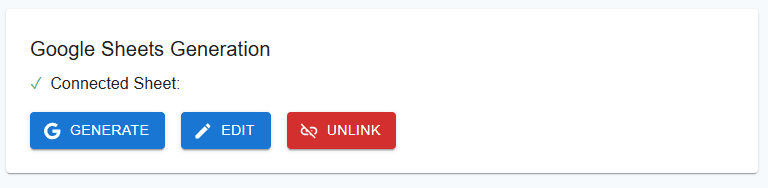
The Solution: Connected Google Sheets
We've added native Google Sheets integration that creates a permanent link between your data source and document template. Configure Once, Generate Forever.
Here's how it works in a nutshell:
1. Create your template in Google Docs
2. Download our auto-generated Excel template
3. Import into Google Sheets
4. Connect the sheet to your template using Google File Picker (same picker used for adding a Google Docs template)
5. Generate documents anytime, directly from your connected sheet
The Magic Part
- One source of truth for all your document data
- Generate new batches with a single click
- Perfect for recurring document generation
- Team members can collaborate on the same sheet
This feature was added due to user request. We are always listening!
Happy to answer any questions 🚀

Hey IH! Quick update on Doxy (Google Docs → PDF templating engine) that I think fellow makers might find interesting from a UX (or rather, DX) perspective.
The Problem:
While building Doxy, I noticed users struggling with our API integration. They had templates in Google Docs but weren't sure how to translate their variables into API requests. Even with Swagger docs, there was friction in constructing the right request body.
The Solution:
Added a "Download JSON" button that leverages our existing template validation infrastructure. Here's what makes it special:
When you add a template to Doxy:
1. It gets thoroughly scanned and all variables are extracted (text, tables and images)
2. Each variable is rigorously validated for API compatibility
3. Template only gets accepted if all variables pass validation
Now, with the new JSON button, you can:
- Get a complete API request body for any validated template
- Receive properly structured JSON with VALUE_PLACEHOLDER markers
- Copy-paste directly into our Swagger docs to test the API
Tech detail for the curious: Our validation uses Unicode-aware regex (/^[\p{L}\p{N}_]+$/u) - supporting international variable names while ensuring they're safe for JSON. This means your templates can use variables like {{München}} or {{piñata}}, making it truly international-friendly!
Example:
Template text: "Dear {{client_name}}, your order #{{order_id}} is ready"
↓
Generated JSON:
{
  "templateId": "d290f1ee-6c54-4b01-90e6-d701748f0851",
    "variables": {
      "client_name": "VALUE_PLACEHOLDER",
      "order_id": "VALUE_PLACEHOLDER"
   }
}
Why This Matters:
1. Zero guesswork for API integration
2. Faster developer experience
3. Fewer support tickets about API usage
4. Makes testing in Swagger docs trivial
The beauty is in the simplicity - since we already validate everything upfront when templates are added, we can confidently generate API-ready JSON that just works.
Hey makers! Excited to share a new feature we just launched at Doxy that makes document automation even more powerful: Dynamic Image Replacement.
What's New?
You can now dynamically replace images in your Google Docs templates! Perfect for:
📝 Electronic signatures
🏢 Company logos
🪪 ID photos
📸 Product images
🤳 Profile pictures
How It Works
In your Google Doc template, add any placeholder image
Set its alt text as a variable (e.g., {{signature}} or {{company_logo}})
When uploading your template, Doxy's scanner will detect these image variables
Upload your replacement images through our UI (API upload coming soon)
Watch as Doxy perfectly replaces the images while maintaining aspect ratios and positioning.
Technical Details
Supports JPG, JPEG, PNG, and GIF formats
Images up to 50MB
Maintains original image positioning and sizing
Center-crop fitting to ensure consistent layouts
Secure image handling with expiration policies
Read the docs for more
📣 Big Shout out to @AntonBz for the excellent idea!
👋 Hey IH!
I'm excited to share Doxy - a tool that turns Google Docs templates into automated PDF generators.
Why I Built This
I built Doxy after battling with a messy PDF conversion chain at work. Google Docs is great for making templates, but turning them into pixel-perfect PDFs at scale was a nightmare. I decided to fix that.
What It Does
Upload your Google Doc template once
Generate thousands of perfectly formatted PDFs
Maintain 100% formatting fidelity
Supports tabular data, including dynamically adding rows
Handle bulk processing via Excel uploads or API
Current Status
🚀 Live and processing documents
📈 Growing steadily
Looking For
Feedback on the app and/or landing page
Feature suggestions
Early adopters who need to generate lots of PDFs
Would love to hear your thoughts and answer any questions!
https://landing.doxy.ink
-
2
Hey, this just the tool I was searching for.
Does it allow image uploading?. If it does my company I work at would be very interested in using this tool. + If it does, I know a very big market for this tool
-
1
@winwthwes Download as PDF is perfectly fine if all your are looking for is a simple format conversion. The value proposition here is the templating engine, which supports text, tables and now images, allowing a one-to-many relation.
-
1
Hi Mat, congratulations on your progress so far. What's wrong with Google Docs' Download as PDF button?
-
1
Thanks @AntonBz. I'm working on adding image injection/replacement. Will update in due course.
-
1
This comment was deleted 2 years ago


Comment