
Easy Site Search
search bar, search widget, no-code / low-code website search

It's been exactly one month since I started marketing Easy Site Search, my no-code widget that lets website owners add search functionality to any site without writing a single line of code.
What is Easy Site Search?
It's a dead-simple search widget you can add to any website in minutes. No coding required - just paste a snippet and you're done. Your visitors get fast, accurate search results without you having to build anything custom.
The best part? There's a lifetime free plan with limited features to get you started!
The Marketing Journey So Far
I launched marketing efforts about a month ago (with a bigger push in the last week), and I wanted to share the results and lessons learned so far.

The Numbers (Full Month)
806 page views
458 visits
422 unique visitors
74% bounce rate
32s average visit duration
15 users total, no paid subscribers yet
Traffic Sources
The biggest traffic sources have been:
IH (112 visitors) - Where I'm posting this right now!
Reddit (various subreddits, ~69 visitors combined)
Product Hunt (11 visitors)
Other sources include Google, Bing, DuckDuckGo, and startupbase.io
(Note: These numbers reflect only tracked visits - actual traffic are actually higher as some visitors use ad/tracking blockers)
Most Popular Pages
The homepage is getting most views (81%), followed by the getting-started pages. Docs and blog posts I made are also picking up.
What's Working
IndieHackers community - You folks are amazing! The feedback and support have been incredibly valuable.
Technical content - Blog posts explaining search concepts like crawlers and indexing are getting decent engagement.
Clear documentation - People are spending time on the getting-started pages, which suggests the onboarding flow is working.
Challenges
High bounce rate (74%) - Many visitors aren't exploring beyond the first page.
Converting visitors to paid users - Still working on optimizing the funnel from free to paid plans.
Finding the right positioning - Testing different messaging to see what resonates.
What I've Learned
Looking at the traffic spikes in the graph, it's clear that content sharing and community engagement drive most visits. The big spike around March 5th shows how powerful a good community post can be.
Next Steps
My goal is to get my first paying customer by the end of April (so about 1.5 months from now). To get there, I'm planning to create more targeted content that addresses specific pain point and each out to small business owners and agencies directly.
Questions I have to you:)
Have you implemented search on your website? What solution did you choose?
If you've looked at Easy Site Search but didn't try it, what held you back?
Any marketing channels you'd recommend for a tool like this?
I'll be sharing monthly updates on this journey. If you're building a website and need search functionality, I'd love for you to check out Easy Site Search and let me know what you think!
Happy building!


Hey again Indie Hackers,
I'm excited to share a new tool I've created that solves a common problem for WordPress site owners - adding powerful full text search functionality.
Easy Site Search is a no-code website search solution, and now we have a plugin that automatically adds a floating search button to any WordPress site. It provides comprehensive full text search across your entire content. No configuration needed, just install the plugin and enter your website key.
What makes it different from WordPress's built-in search:
- Actually works! Unlike WordPress's basic search that often misses content
- Full text search that finds partial matches and related content
- Real-time results as users type (no page reloads)
- Smart ranking that puts the most relevant results first
Other benefits:
- Zero setup (seriously, just install and enter your key)
- Floating search button that works on any theme
- Lightning-fast results without slowing down your site
- Works on all devices (mobile-friendly)
Pricing options:
- Free forever tier with basic search features to get you started
- Starter plan now just $9/month for small to medium websites with full text indexing for hundreds of pages
If you're running a WordPress site and want professional search capabilities without the complexity, you can grab the plugin here:
https://easysitesearch.com/wordpress-plugin/
Would love to hear your thoughts or answer any questions!

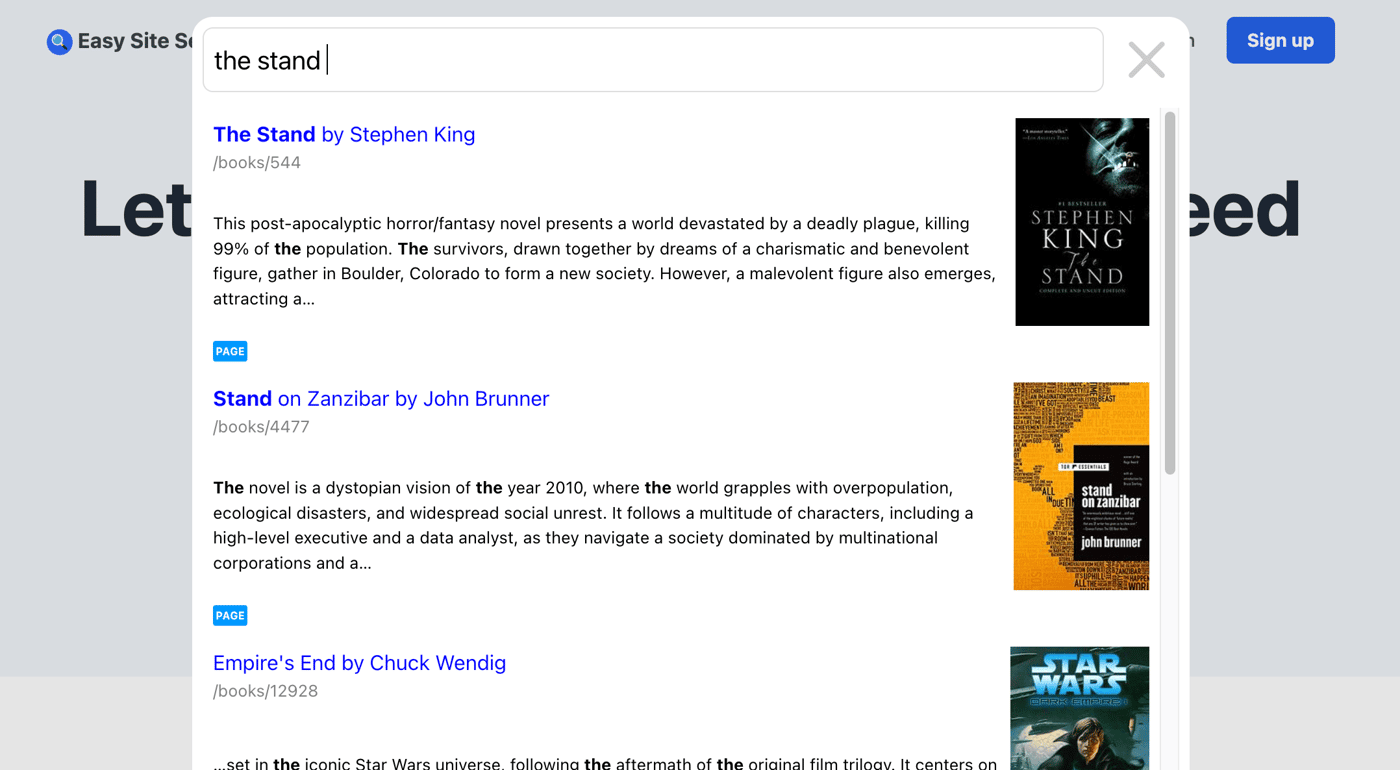
Figured that science fiction books are more engaging than random pages from the landing page.
Make sure to check this out at https://easysitesearch.com/

Hey Indie Hackers! I wanted to share a quick win from my micro-SaaS journey that highlights the importance of listening to early users.
The Problem
After launching my no-code site search widget last month, I received consistent feedback from early adopters. Many website owners loved the easy installation but wanted more control over exactly which pages were included in their search results.
One user with a large documentation site specifically requested: "I only want my tutorials searchable, not my changelog or company pages."
The Solution: Whitelist Feature
Based on this feedback, I just released the new "Whitelist" setting that lets users control exactly which parts of their website are searchable using simple pattern matching.
For example:
/blog/*makes only blog posts searchable/docs/tutorials/*includes just the tutorials section/blog/*, /resources/*combines multiple sections with comma separation
These patterns follow standard glob syntax, making them powerful yet familiar to those with technical experience.
This seemingly small feature has made a huge difference for users with larger sites who need more focused search experiences.
Implementation Process
The whole feature took just an hour to implement, test, and deploy. I prioritized it because:
Multiple users requested similar functionality
It solved a real pain point that was preventing adoption
The scope was manageable for a quick win
Early Results
Since launching this feature:
The user who requested it was immediately satisfied and praised the flexibility
Other users have found new ways to customize their search experience
It's become a selling point that differentiates my tool from competitors
This simple addition significantly increased the flexibility of the product while requiring minimal development effort.
Key Takeaway
Sometimes the most valuable improvements aren't fancy new features but simply removing friction points identified by your actual users.
What small features have you added based on user feedback that made a big difference? I'd love to hear your experiences!

Hi!
Today, I wrote a quick docs entry on how to integrate the product with any NextJS app. Similar approach should work with React or other frameworks, let me know if you would like to see a similar guide for a specific one.
The guide:
https://easysitesearch.com/docs/frameworks/next-js/
Cheers:)

Hey IH community 👋
I'm the founder of Easy Site Search, and I wanted to share some insights about site search and why it might be a game-changer for your business website.
What is Site Search, Really?
Site search is simply a search box on your website that lets visitors find exactly what they're looking for, without navigating through menus. Unlike Google (which searches the entire internet), site search only looks through your website content.
When someone uses your site search, they get a results page showing the most relevant content from your site. Simple concept, but the impact on user experience and business metrics can be significant.
Why Adding Search Boosts Conversion Rates
One of the most compelling reasons to add search to your website is the direct impact on conversions. Users who search convert 2-3x more often than those who don't. Why? They know exactly what they want and are ready to act - your job is just to remove friction between them and checkout. For bootstrapped businesses, that's meaningful revenue without spending more on ads.
Keeping Visitors From Bouncing
Without search, visitors often leave when they can't find what they need (especially on mobile). Search gives them an option when they're about to give up and helps visitors who land on the wrong page find what they're actually looking for.
Websites with effective search typically see bounce rates drop by about 30%. More importantly, the visitors staying longer are often those with high purchase intent who just needed help finding the right page or product.
Helping Users Discover Your Best Content
As indie founders, we create tons of valuable content that often gets buried deep in our sites. Search helps surface older blog posts, documentation, and resources that visitors wouldn't find through navigation alone.
This increases pages per session by about 15-20% and keeps people engaged with your content longer, giving you more opportunities to convert them.
Why I Built Easy Site Search
After experiencing these benefits firsthand, I built Easy Site Search as a no-code solution that any website owner can implement quickly. I wanted to make these powerful conversion benefits accessible to indie businesses without requiring developer resources or complex integrations.
Our widget can be added to any website with a simple embed code, giving your visitors the ability to search your entire site instantly. Check it out, we need your feedback :)

Hey fellow indie hackers!
I wanted to share a problem I solved that might help some of you too. A month ago, I launched Easy Site Search - a simple search widget anyone can add to their website without coding.
The problem I set out to solve
Have you noticed how many small business websites and blogs don't have search functionality? It's usually because:
Adding search is surprisingly technical
Existing solutions are either too complex or too expensive
Nobody wants to spend days implementing something that seems like it should be simple
What I built
Easy Site Search is a drop-in widget that takes literally minutes to set up. You paste one line of code into your site, and visitors can instantly search your content.
I built it using Rust and HTMX for speed and simplicity. The search is lightning fast and works on any type of website - WordPress, Webflow, custom-built sites, whatever you're using.
Why I'm sharing this now
I launched about a week ago (submitted to Product Hunt and a few directories), and I'm on a mission to get my first paying customer by the end of April.
But to reach that goal, I realized I needed to get more people using it first.
So here's what I'm offering to the IH community
I just introduced a completely free plan that includes:
Up to 10,000 searches per month
Support for up to 50 pages on your site
The full search experience (no "powered by" branding)
This isn't a trial - it's a permanent free tier for smaller sites.
What I'm learning from this journey
Building the product was the easy part - marketing it is much harder
People need to see value before they'll pay
Starting with a generous free tier seems counterintuitive, but it's actually helping with adoption
What's next?
I'm focused on getting feedback and improving the product based on real users. If you have a website that could use search functionality, I'd love for you to try it out and let me know what you think.
Has anyone else found success with a freemium approach? I'd love to hear your experiences!
-
2
Love that you’re making it easy and accessible, especially with a free tier to help smaller sites.
-
2
The project looks helpful will give it a try on my new product ( 20minsrecipes dot com)
-
2
Valuable product
-
1
thanks!
-
-
1
Awesome let me know if you need anything;)
-
1
This indie hacker built a search widget called Easy Site Search, aimed at helping small businesses and blogs easily integrate search functionality without coding. Many sites lack search features due to the complexity and cost of existing solutions. To solve this, the creator developed a simple, fast, drop-in widget that works on any website (WordPress, Webflow, custom-built, etc.). Built using Rust and HTMX for speed, it requires just one line of code. The tool is available with a generous free plan, offering up to 10,000 searches per month and support for up to 50 pages, with no branding. The goal is to gain adoption and feedback, ultimately driving the first paying customer. This freemium model, while initially counterintuitive, is boosting usage and feedback. Additionally, the creator mentions using Blockbench for 3D modeling.
-
1
This comment was deleted 2 years ago
-
1
This comment was deleted a year ago


Wrote a short and simple post covering how search crawlers work, for non-technical people out there:). This is exactly how our search widget obtains the page information & how it is able to prepare results.
-
1
Great post! It's really helpful to break down how search crawlers work for those who aren't as tech-savvy. It's fascinating to see how your search widget gathers information and delivers results. Keep sharing these insights!


Quick update,
From now on if the indexed page contains an image that could be rendered as a thumbnail, it will be automatically presented in the search results.
Also, on the marketing / content side - we have this new blog post that explains what the whole "indexing" means in terms of our search engine / search solutions in general: https://easysitesearch.com/blog/what-is-search-indexing/
Cheers!
Even if you're not tech-savvy, adding a search bar is simpler than you might think. In this guide, I'll show you several easy ways to add this powerful feature to your website, no coding required! Shameless plug included as the last no-code option.
https://easysitesearch.com/blog/adding-website-search-guide/
2 Comments
The issue with your high bounce rate and the fact you have no paying customer yet is that you promote your site on sites mostly full of founders. We visit your site just to see what you are doing and then we leave.
Think: why did you develop this tool? I'm sure you are going to say something like "To help X solve Y problem.". OK, go to where "X" hangs out online and there you have to promote your tool, not here. Most people think IH is a good place to get feedback, sadly, that's for the 1st month of your startup. I mean when you are deciding how are you going to do the first steps of your journey. Then, you have to search for your ideal customer's feedback.
Who are your customers? Where are they? Go there.
My 2 cents.
Thank you, thats very good advice.