
Excel to HTML table
Perfect HTML tables from your Excel sheets.

Hey Indie Hackers!
My last update here was on April 7, 2020. It is now 2026. A lot has changed in the world over the last six years, but my little Excel add-in, ExcelToHTML, has quietly kept chugging along in the background.
I wanted to share a quick retrospective on how a zero-maintenance side project survived, the metrics we've seen, and the major new pivot we just launched: Publish to Web.
### The 6-Year Slow Burn (The Metrics)
When I first launched ExcelToHTML, the goal was simple: solve the nightmare of Excel's bloated "Save as Web Page" output by letting users select cells and copy clean, lightweight <table> HTML.
Without any active marketing, the add-in found its niche. Looking back at our analytics from 2020 to 2025, the numbers tell a fascinating story of organic B2B utility:
* Steady Traction: We've averaged about 1,000 new users a year and ~6,000 table exports annually.
* The Workday Pattern: 87% of our usage happens strictly on weekdays. This isn't a hobbyist tool; it's a utility people rely on to get their office work done.
* The Super-User: We have one absolute legend of a power user who has logged 7,121 lifetime exports.
### The Big 2026 Pivot: From "Copy-Paste" to "Instant Hosting"
While the core "Select cells → Copy clean HTML" tool worked great for CMS editors, we kept seeing users who wanted to share their data but didn't want to deal with pasting code into a website at all.
So, we built and just launched our biggest feature yet: Publish to Web.
Now, instead of just copying HTML to your clipboard, you can select a range of cells in Excel, click Publish, and instantly get A Secret, Hosted URL: A clean, beautifully formatted web page displaying your table (hosted on our servers).
### Monetizing a Utility
For years, the add-in was entirely free. To support the hosting costs of the new publishing pipeline, we've finally integrated Stripe and structured our tiers:
* Free Tier: Basic clean HTML exports.
* Pro Tier ($50/year or lifetime): Outlook-safe email formatting, hyperlink preservation, cell comments on hover, and quick previews.
* Pro+ Tier ($19/month): The new "Publish to Web" hosting, auto-updating embeds, access control, and analytics.
I'd love to hear your thoughts on the new publishing workflow and our pricing model! Check us out at [exceltohtml.com](https://exceltohtml.com) or find "Selection To HTML" in the Excel Add-in store.


March was the best month ever for Excel-to-HTML, my Microsoft Excel add-in for converting spreadsheet cells to HTML tables. People used it 650 times last month to convert cells to HTML, and this month is on track to do well too.
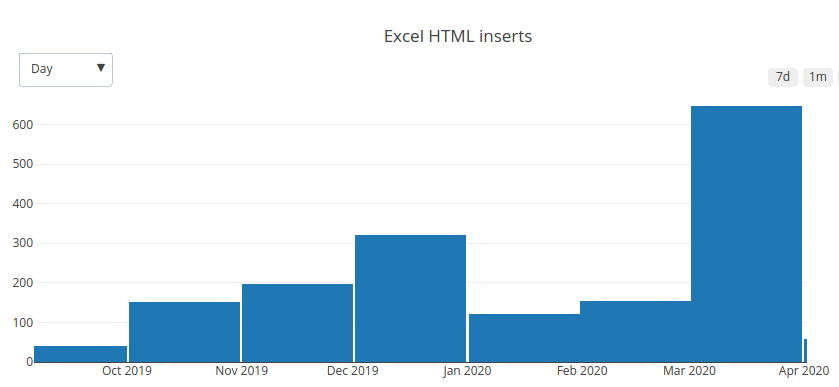
I was trying to figure out why and then I realized the obvious answer. People are probably using the add-in to share their tables of virus related data during the current pandemic.
This pandemic is obviously a terrible net negative for millions of people, but it's interesting to see which things are growing because of it.
-
1
This is a cool concept. What advantages does it have over google sheets and embedding a sheet? or just publishing the sheet itself? I can imagine some but I'd like to see what your thoughts are.
-
2
Hey Dan! The add-in doesn't work with Google Sheets, it's an MS Excel only thing. I guess the main difference from embedding a sheet is being able to get pure HTML code of part of your sheet so that the rendering looks the same.
-
1
I'd imagine with Google Apps Scripting you could make a google sheets version. https://developers.google.com/apps-script
I'm just going to leave that distraction of a thought here for you to think about. :D
-
2
Heh yes I could do it but it doesn't seem worthwhile at this stage. Thanks for the tip though!
-
-
-


- Tumbleweed resistant kevlar vest - check!
- Crickets-sound deflecting ear plugs - check!
- Server ready for a stampede of zero new customers - check!
Alright people we are ready to roll.
https://www.producthunt.com/posts/excel-to-html-table
Wish me luck! :pray:

I just launched my Excel add-in on Hacker News:
https://news.ycombinator.com/item?id=21114697
Fortunately my timezone means I now get to go to sleep instead of compulsively hitting the refresh button all day long. :D
I am following a strategy of scheduling posts on different sites, Slack chats, and email lists, with the two main ones being Hacker News and then Product Hunt.
For HN I wrote a post (linked above) about how I built the add-in using web tech, which I hope will be valuable to readers there.
I'm hoping this scheduled approach will mean better traction than previous things I have launched.
Tomorrow is Product Hunt.
Will report back!
-
1
Update: so far the HN post has received 8 upvotes and 2 comments.
"Won't take long" said programmer brain, expecting maybe two or three days to bang this thing out.
Some three months later the Add-in is finally approved by the Microsoft submission process and makes it into the store. It hasn't shown up just yet but as soon as it does I'm going to Product Hunt this baby!
At a function for one of my clients I asked an economist what the most annoying part of her job is. She thought about it for a bit but couldn't think of anything: "I love my job!"
At the end of the night just as she was leaving she tapped me on the arm "actually the most annoying thing in my work is when I have to turn a selection of Excel cells into an HTML table to publish it on our website."
Bingo! Exactly 15 days later I started coding an Excel Add-in to solve this problem for her.
Comment