
Flexy
Your Vibe Coding Project Launched.
AI has fundamentally changed how software gets built.
Today, a founder can describe an idea to ChatGPT, Claude, Cursor, Windsurf, or another AI coding tool and have a working prototype within hours.
Landing pages.
CRUD applications.
Dashboards.
API integrations.
Admin panels.
Things that previously required weeks of engineering effort can now be generated in a single afternoon.
This shift is exciting.
But we've noticed something interesting.
Most software projects don't fail during the first 80%.
They fail during the last 20%.
The New Bottleneck Isn't Writing Code
For years, the biggest challenge in software development was creating code.
Today, AI can generate enormous amounts of code almost instantly.
The bottleneck has shifted.
Instead of asking:
How do I build this?
Teams are increasingly asking:
How do I actually ship this?
That's a completely different problem.
A prototype may work on your machine.
A generated API may appear functional.
A dashboard may look complete.
But production software requires much more than generated code.
It requires debugging.
Testing.
Integrations.
Security reviews.
Database optimization.
Deployment pipelines.
Monitoring.
Performance tuning.
Documentation.
Production readiness.
These are the areas where many AI-generated projects start slowing down.
What We Observed
Over the last year, we've spoken with founders, SaaS operators, agencies, and engineering teams experimenting with AI-assisted development.
The pattern is remarkably consistent.
A founder uses AI to build an MVP.
The product gains traction.
Customers start using it.
Then reality arrives.
A Stripe integration fails.
A webhook behaves unpredictably.
Authentication breaks.
Database queries become slow.
A production deployment goes wrong.
An API integration needs custom logic.
A bug appears that AI can't easily diagnose because it depends on business context.
The founder suddenly finds themselves spending more time debugging than building.
Not because AI failed.
But because production software still requires engineering.
The Hiring Problem
Most of these issues are relatively small.
A bug fix.
A feature update.
A deployment issue.
An API integration.
A database optimization.
The problem is that solving a small development task often requires a surprisingly large process.
You post on Upwork.
Review proposals.
Conduct interviews.
Negotiate pricing.
Explain requirements.
Manage delivery.
Review work.
Handle revisions.
By the time you've completed the hiring process, the original task could have already been finished.
For startups and small teams, this friction becomes expensive.
Not just financially.
But in lost momentum.
Why We Built Flexy
Flexy was built around a simple observation:
Not every software problem requires hiring someone.
Sometimes you simply need a task completed.
You know what needs to be done.
You know the outcome you want.
You don't want to recruit.
You don't want to manage contractors.
You don't want to negotiate hourly rates.
You just want the work shipped.
That's the gap we designed Flexy to solve.
Instead of hiring developers, teams submit development tasks.
We evaluate the scope.
Provide a fixed-price quote.
Match the task with a developer experienced in the required technology stack.
And focus on delivering the result.
The goal isn't replacing engineering teams.
The goal is helping teams remove execution bottlenecks.
Who Flexy Is Built For
Flexy is especially useful for organizations that already know what needs to be built but don't want the overhead of traditional hiring.
This includes:
AI builders trying to turn prototypes into production-ready software.
SaaS founders handling feature requests and technical debt.
Agencies that occasionally need additional development capacity.
Startups that need quick execution without increasing headcount.
Engineering teams that want to offload maintenance work and focus on strategic initiatives.
In many cases, the challenge isn't finding work to do.
It's finding enough engineering bandwidth to do it.
The Future of Software Development
We don't believe AI will eliminate software engineers.
We believe AI changes where engineering effort gets spent.
The future isn't AI versus developers.
The future is AI plus developers.
AI accelerates creation.
Engineers ensure reliability.
AI generates solutions.
Engineers validate assumptions.
AI creates velocity.
Engineers create production-ready systems.
As AI continues reducing the cost of generating code, execution becomes increasingly valuable.
That's where we see Flexy fitting into the development ecosystem.
Helping teams bridge the gap between generated software and shipped software.
Final Thoughts
The software industry is entering a fascinating era.
Building software has never been easier.
Shipping software still requires discipline, experience, and execution.
Most teams don't need another freelancer marketplace.
They don't need another agency engagement.
They don't need another hiring process.
Sometimes they simply need a trusted way to get development tasks completed.
That's why we built Flexy.
Because the last 20% of software delivery still matters.
And in many cases, it's the part that determines whether a project succeeds or fails.
If you're building with AI and need help turning prototypes into production-ready software, check out Flexy
We're building a simpler way to get development tasks completed without the friction of traditional hiring.

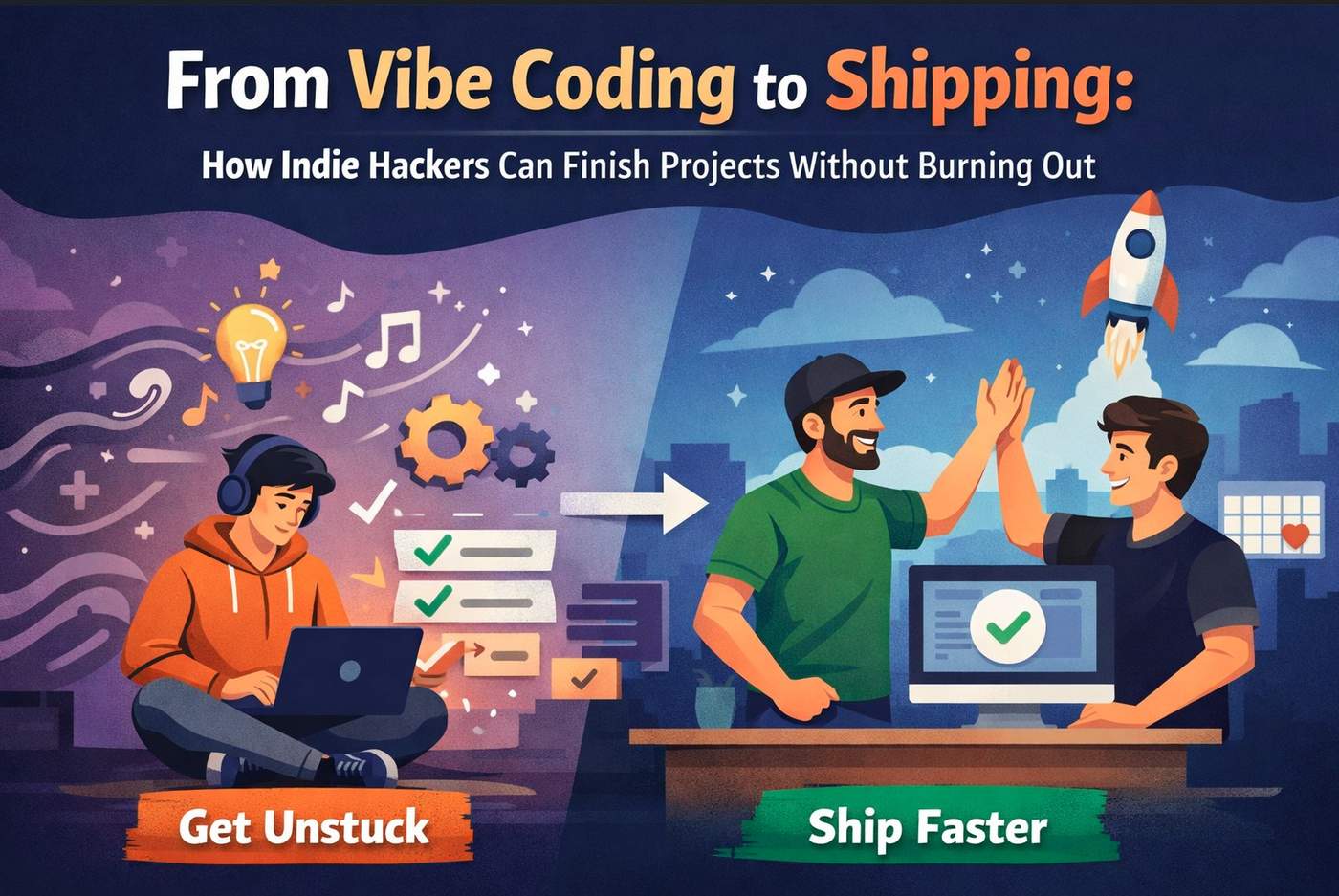
Vibe coding burn outs don't arrive with a warning. One day you are shipping features at 1 a.m., riding pure momentum. A few weeks later, the repo is untouched, the idea feels heavy, and you are quietly avoiding your own project.
If you are a vibe coder, this probably sounds uncomfortably familiar.
This article is for vibe coders who love building but are tired of never finishing. For builders who move fast on instinct, not plans and pay for it later with stalled launches and mental fatigue. And especially for those who have never had proper vibe coding support, guidance, or a partner to help carry the weight when things get messy.
Because right now, there is a window to try Flexy with your first task free and if you are already flirting with burnout, this might be the lowest-risk way to save your project and your energy.
The Unspoken Reality of Vibe Coding Burnouts
Vibe coding works brilliantly at the start.
You don't overthink.
You don't plan too much.
You just build.
But the same traits that make vibe coding powerful also make it fragile.
Burnout usually creeps in when:
The project is "almost done" for weeks
Small tasks pile up
Nothing feels exciting anymore
Every session starts with friction instead of flow
You’re not lazy. You are overloaded.
And most vibe coders don’t burn out because they worked too hard, they burn out because they worked alone for too long.
Why Vibe Coders Rarely Ask for Help (Until It’s Too Late)
There’s a pattern:
"I’ll just do it myself."
"It’s probably a quick fix."
"I don’t want to explain my code to someone."
"Hiring help feels risky."
"I’ll come back to it later."
Later becomes never.
Traditional help doesn't fit vibe coders well. Agencies are overkill. Freelancers require onboarding and trust. And if you come from a non-technical background, asking for help can feel even more intimidating.
So most vibe coders push through alone until the project quietly dies.
The Cost of Burnout Isn’t Just Emotional
When vibe coding burn outs hit, the damage goes beyond motivation.
You lose:
Momentum
Confidence
Learning cycles
Launch opportunities
Worse, unfinished projects pile up. Each one makes it harder to start the next.
Burnout teaches your brain a dangerous lesson: building leads to exhaustion, not rewards.
That’s the real risk vibe coders face.
What Most Vibe Coders Actually Need (But Rarely Get)
Here’s the truth most builders won’t say out loud:
You don’t need more tutorials.
You don’t need another framework.
You don’t need to "just focus harder."
You need vibe coding help at the exact moment your energy dips.
Not a manager.
Not a long-term hire.
Not someone to take over your project.
You need:
Short-term support
Clear task delegation
Someone who understands shipping
Someone who won’t kill your vibe
You need a vibe coding mate, not a replacement.
Where Flexy Fits Into the Picture
Flexy is built specifically for vibe coders who want to ship, not over-organize.
It works as a vibe coding partner you stay in control, but you’re no longer carrying everything alone.
Instead of open-ended contracts, Flexy focuses on:
Small, concrete tasks
Quick turnaround
Clear outcomes
No long-term commitment
You delegate the parts that drain you.
You keep the parts that excite you.
That balance is what prevents burnout.
Why "First Task Free" Is a Big Deal (And Why You Shouldn’t Ignore It)
Let’s be honest: most vibe coders are skeptical.
You might be thinking:
"Will they get my code?"
"Will this slow me down?"
"Is it worth the effort?"
That's exactly why the first task is free.
This isn't a demo.
It's not a sales call.
It's not a trial full of restrictions.
It's real work, on your real project, with zero financial risk.
If you are already feeling the weight of unfinished tasks, this is a rare chance to experience vibe coding support before burnout forces you to quit.
Common Tasks Vibe Coders Quietly Hate Doing
Burnout often comes from a specific type of work not coding itself.
Vibe coders often struggle with:
Cleanup and refactors
Bug fixing
Edge cases
Deployment tweaks
Integration glue code
"Unsexy" finishing tasks
These tasks aren't hard they are draining.
Flexy shines at vibe coding task delegation: you hand off the friction while staying focused on creative flow.
Especially Valuable If You are From a Non-Technical Background
If you come from a non-technical background, vibe coding can feel even more isolating.
You might:
Doubt your implementation
Spend hours second-guessing
Avoid releasing because "it’s probably wrong"
Having a vibe coding mate who understands shipping reduces that anxiety dramatically. You don’t need to know everything you just need to move forward safely.
Flexy provides that guardrail without judgment or ego.
The FOMO Most Vibe Coders Don’t Realize Yet
Here’s the uncomfortable truth:
>Right now, other vibe coders are finishing and launching not because they are >better, but because they are not doing everything alone.
They are getting feedback sooner.
They are shipping MVPs faster.
They are learning from real users.
Meanwhile, burnout quietly sidelines good ideas.
Trying Flexy while your first task is free removes almost every excuse:
No financial risk
No long-term lock-in
No pressure to keep going
Waiting until you are fully burned out is the expensive choice.
This Is Not About Working More
Flexy isn’t about hustle.
It’s about sustainability.
The goal isn’t to grind harder it’s to keep building without burning out.
Vibe coding works best when:
Momentum stays high
Energy is protected
Progress is visible
Support at the right moment can be the difference between a launched product and another abandoned repo.
When You Should Try Flexy (Hint: Probably Now)
You should seriously consider Flexy if:
You feel stuck on finishing tasks
Your project is “almost ready” but never ships
You are losing excitement
You have ghosted your own codebase before
You are close to burnout but not ready to quit
That window before burnout fully hits is where Flexy delivers the most value.
Final Thought
Vibe coding burn outs don’t mean you failed.
They mean you tried to do too much alone.
Right now, you can test a different path—with real help, real progress, and zero upfront cost.
Your first Flexy task is free.
Your project is waiting.
And burnout doesn’t have to be the ending this time.
-
2
the "worked alone for too long" part hit hard. tbh been there multiple times.
found that the key is having help that doesn't require context switching. explaining your code to someone takes more energy than just doing it yourself sometimes.
curious if anyone here uses AI agents for the unsexy tasks? feels like that could be the vibe coding mate without the coordination overhead
-
1
Yes, AI agents works super-duper in the beginning, but at the end when you are close to release, they start fixing a thing and breaking a couple of things!
-
-
2
Succeeding without a plan is basically a miracle. Vibe coding works the same way—if you’re purely instinct-driven, burnout is almost guaranteed. Anyone here actually sustain momentum long-term with zero structure?
-
1
I agree, we focus on bridging that gap and help founders who need support in that area.
-
-
2
Vibe coding is fun until you’re stuck in that “almost done” loop and the boring tasks drain all the energy. Having short, low-commitment help before burnout kicks in feels like the right middle ground.
The “first task free” angle is smart — it removes the fear of slowing yourself down.-
1
It is just our way to provide some value upfront. It's just a beginning. a lot more to come!
-
-
2
I didn’t see an easy way for visitors to contact you or send feedback. I’m building a tiny floating feedback widget called GetSig that drops into any site in a couple minutes. Happy to set you up with free early access if you’d like to try it 🙂
-
1
Hi Rob, what does GetSig does? Why would I want it on my site?
-
1
There are two benefits:
- For an end user it lowers friction in having to leave a page to go to a contact form, allows you to integrate feature requests/bug reports and such
- As a website owner, allows you to integrate contact forms into existing CRM or ticketing platforms with no need to code anything, or simply have it go to your inbox/slack/discord etc.
Use it as a form or use it as a chat flow, can programatically open the form/chat flow from existing contact links
Happy to explain it in more detail if you're interested
-
-
-
1
Flexy helps vibe coders manage workload, reduce burnout, stay creative, automate tasks, streamline projects, improve focus, and maintain healthier work rhythms effortlessly.
-
1
You are right!
-
-
1
One thing I’ve noticed while building and talking to other vibe coders is that burnout doesn’t usually come from the big technical challenges. It comes from the pile of small, context-switch-heavy tasks that show up right when motivation is highest.
I’m curious how others here handle that phase just before launch. Do you intentionally slow down? Ruthlessly cut features? Push through solo? Or bring in help somehow?
Would love to hear what’s actually worked (or failed) for people trying to get projects over the finish line.
-
1
the burnout spike for me isn’t the architecture or the hard problems, it’s the hundred tiny “paper cuts” right before launch: screenshots, onboarding tweaks, privacy stuff, billing, store text, QA, etc
What worked best for me was refusing to polish things users wouldn’t actually notice on day one. Also, I eventually stopped trying to brute-force that phase solo and brought in help for the launch layer. In my case CAS handled the store/UA/monetization side while I stayed on product, which made finishing way less miserable-
1
That's good to know! How is it going with the launch?
-
-


Many indie hackers start projects full of energy and excitement. Ideas flow, MVPs emerge, and coding sessions feel effortless. But somewhere between a half-finished prototype and a live product, momentum slows. Tasks feel tedious, motivation drops, and shipping becomes overwhelming.
The gap between vibe coding and actually releasing is where most solo founders stall. It’s not a lack of skill it’s the nature of finishing. Solo founders often need a combination of structure, focus, and low-risk support to get across the finish line. This article explores practical strategies to ship indie projects faster and shows how leveraging small, fixed-budget tasks can unblock your path to launch.
TL;DR
Vibe coding is great for starting projects but not optimized for finishing. Shipping indie projects requires focus, scope management, and task prioritization. Solo founders can move faster by redefining “done,” separating creative work from execution, and using low-risk external support. Services like Flexy help you complete fixed-budget tasks quickly, letting you finish your MVP or side project without burning out.
Why Indie Hacker Projects Stall
Starting a project is fun because every hour creates visible progress. But later-stage work polishing the MVP, handling deployment scripts, fixing edge cases feels invisible and unglamorous. This shift often kills motivation.
Many indie hackers hit a mental wall here:
The project is functional, but not polished enough to release
Minor bugs, onboarding steps, and edge cases are overwhelming
Motivation alone can’t sustain the effort to finish
Without support, these tasks linger, delaying shipping indefinitely.
Vibe Coding: Your Superpower and Its Limits
Vibe coding fuels creativity and early momentum. It thrives on curiosity, rapid experimentation, and emotional energy. It’s why indie hacker projects exist in the first place.
But finishing requires a different mindset:
Repetition and cleanup
Deployment preparation
Minimal documentation
Final testing
Trying to finish a project using the same exploratory mindset that started it often leads to frustration and burnout. Recognizing this is the first step to shipping faster.
The Hidden Burnout Triggers
Even highly motivated solo founders struggle to ship because of hidden stressors:
Decision Fatigue
Hundreds of small decisions architecture, UI tweaks, deployment choices drain mental energy.
Scope Creep
Adding “just one more feature” or endlessly polishing delays release.
Emotional Attachment
Projects built alone are personal. The thought of releasing invites judgment and slows progress.
Role Overload
Coding, design, deployment, and marketing all compete for attention. Switching contexts repeatedly is exhausting.
Redefining “Done”
Many indie hackers never ship because their definition of done is unrealistic. Shipping doesn’t mean perfect it means usable.
Done is:
Someone else can use the product successfully
The core value works
Failures are handled gracefully
Even a minimal MVP delivers insight, feedback, and momentum. By setting this standard, you remove the pressure of perfection and move closer to release.
Separating Creative Work From Execution
Finishing requires focusing on tasks that bring the product to release, distinct from creative experimentation:
Creative Exploration:
New features
Experiments
Refactors
Execution Mode:
Bug fixes
Deployment and hosting setup
Documentation
Final testing
Timeboxing these modes allows solo founders to maintain energy and clarity, rather than mixing creative flow with repetitive finishing tasks.
Why Small, Fixed-Budget Support Accelerates Shipping
Finishing a project alone is hard, even for skilled builders. Some tasks are tedious, repetitive, or slow-moving things like deployment configuration, small integrations, or cleanup scripts.
This is where Flexy comes in. Flexy is a productized service designed specifically for indie hackers and vibe coders. It lets you:
Submit small, fixed-budget tasks
Get quick turnarounds from expert developers
Focus your energy on core development while remaining in control
Even completing one small task with Flexy can unblock momentum and get your project closer to release without risk or overhead. Many founders start with a single free or low-commitment task to see the effect.
By outsourcing just the finishing touches, you can focus on the parts of building you love and ship faster.
Get unstuck by delegating tasks to Flexy with fixed-budget, fast turnaround, without burning out. Try Flexy - first task for free!
Practical Ways to Ship Faster
Here are strategies to help you finish without burning out:
1. Cut Scope Aggressively
Only include features that validate your core value. Manual work can temporarily replace automation.
2. Timebox the Finish Line
Set a fixed release window and a limited task checklist. Open-ended “I’ll ship when ready” schedules rarely work.
3. Accept Imperfection
Rough UI, manual onboarding, or minimal error handling are acceptable in early releases. You can optimize later.
4. Reduce Cognitive Load
Externalize your to-do list. Writing down every task reduces mental clutter and speeds decision-making.
5. Protect Energy
Short, focused work sessions beat marathon coding. Preserve mental clarity and prevent fatigue.
6. Use Low-Risk Task Support
Submitting fixed-budget tasks to a service like get help shipping your product lets you offload tedious or specialized work. Even one task completed externally can break inertia and accelerate release.
Building the Release Muscle
Shipping isn’t a personality trait it’s a skill. Some founders ship effortlessly because they’ve practiced finishing:
They know when to stop
They embrace imperfection
They trust feedback over assumptions
If you struggle to finish side projects, it’s not failure it’s an opportunity to train your release muscle. Using low-risk support accelerates this learning.
After You Ship
Releasing your MVP even imperfectly changes everything:
You receive real user feedback
Motivation returns
The project feels lighter
Mental bandwidth increases for new ideas
Finished projects create momentum. Unfinished ones create stress.
Get unstuck by delegating tasks to Flexy with fixed-budget, fast turnaround, without burning out. Try Flexy - first task for free!
Conclusion
Vibe coding fuels creativity, but shipping requires focus, structure, and sometimes external support. Indie hackers and solo founders can accelerate release by:
Redefining “done”
Separating creative work from execution
Cutting scope and timeboxing
Leveraging small, fixed-budget tasks to unblock progress
Services like Flexy let you complete those finishing tasks quickly, safely, and without overhead. By using low-risk support strategically, you can go from stalled side project to live product, gain momentum, and keep building without burning out.
Shipping smarter not harder is how you turn ideas into released projects.
The gig economy has transformed software development, enabling businesses to hire C#, .NET, and Azure specialists on-demand. This guide explores how modern teams leverage freelance developers through fixed-price productized services versus flexible value-based models—and why Flexy delivers the best of both worlds for development projects.
"Gig economy development = global C#/.NET/Azure talent at fixed prices."
Gig Economy Software Development Defined
Businesses hire freelance developers for specific projects, features, or bug fixes instead of full-time staff. Perfect for:
C# API development
.NET application refactoring
Azure cloud migrations
ASP.NET performance optimization
Database optimization projects
Value-Based Freelancing vs Productized Services

Flexy: Gig Economy Development Mastered
Flexy offers outsourced C#, .NET, and Azure development with fixed prices. Get bug fixes, custom features, and cloud modules from Microsoft-certified developers. Enjoy 48-hour start times, money-back guarantees, dedicated project managers, and production-ready code. Perfect for small teams needing reliable Microsoft technology solutions. Start your gig project
Gig Economy Development Challenges
67% of freelance projects miss deadlines
42% quality issues with random freelancers
78% struggle with remote coordination
35% IP protection concerns
Flexy Solves Gig Economy Pain Points
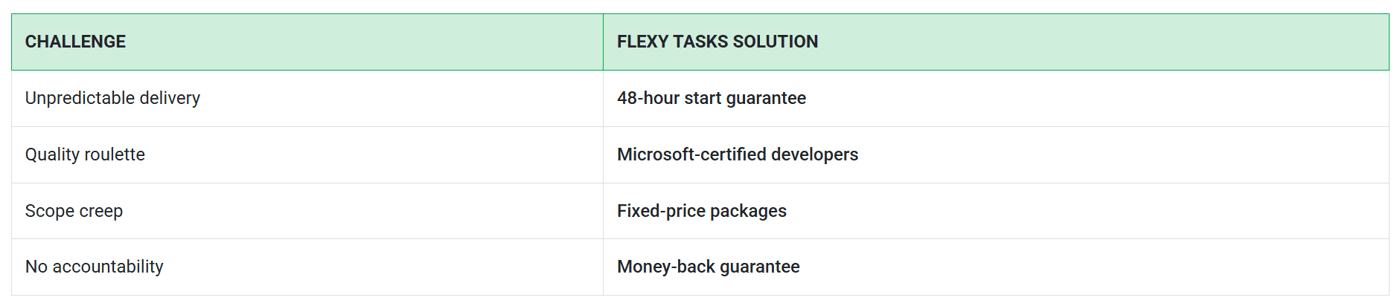
Best Practices for Gig Economy Development
Choose productized packages for 80% of C#/.NET/Azure work
Clear acceptance criteria upfront
Microsoft-certified talent only
Fixed timelines, not estimates
Single project manager contact
Real-World Gig Economy Use Cases
SaaS Startup: .NET API development (5 days)
E-commerce: ASP.NET performance optimization (48 hours)
Enterprise: Azure migration packages (2 weeks)
Agency: C# module outsourcing (ongoing)
Why Teams Choose Flexy for Gig Work
87% faster delivery vs traditional freelance
92% less rework with certified developers
100% fixed pricing - no surprises
Enterprise-grade security + NDAs
Scales from 1 task to 50 developers
Frequently Asked Questions (FAQs)
What defines gig economy software development?
Short-term C#, .NET, Azure projects with freelance specialists instead of full-time hires. Flexy makes it reliable.
Value-based freelancing vs productized services?
Value-based = custom outcomes (slow). Productized = fixed packages (fast). Flexy = productized C#/.NET excellence.
How does Flexy improve gig economy work?
48-hour starts, Microsoft-certified developers, money-back guarantees, production-ready code, dedicated project managers.
What C#/.NET tasks work best in gig economy?
Bug fixes, API development, Azure deployments, performance optimization, feature modules—all perfect for Flexy packages.
Is gig economy development reliable?
With Flexy? Yes. 92% less rework, guaranteed delivery, enterprise security vs traditional freelance roulette.
Gig Economy Development Done Right
Skip freelance marketplaces. Use Flexy for reliable C#, .NET, and Azure development that scales with your business.
When outsourcing software development, businesses often face a key decision: Should they opt for an agency retainer model or a pay per task model? Both options offer unique benefits and drawbacks, and the choice can significantly impact your project budget and efficiency.
This article compares agency retainers vs pay-per-task in detail, helping you determine which model saves more money and better fits your business needs.
"Choosing between agency retainers and pay-per-task isn’t just about price—it’s about aligning your budget with your project’s real needs."
What Is the Agency Retainer Model?
The agency retainer model involves paying a fixed monthly fee for a set number of hours or services from a development agency. This arrangement is popular for ongoing projects, regular maintenance, or businesses with steady workloads.
Benefits: Predictable costs, dedicated resources, priority support, and faster turnaround.
Drawbacks: Risk of paying for unused hours, less flexibility for one-off projects, and contract lock-ins.
Retainers are ideal if you have a continuous need for development work and value a stable, responsive team.
What Is the Pay-Per-Task Model?
The pay-per-task model charges you only for completed tasks or specific deliverables. You pay as you go, with no ongoing commitment.
Benefits: No upfront costs, maximum flexibility, pay only for what you need, and easy to scale up or down.
Drawbacks: Less predictable costs, potential delays if resources are busy, and less priority for urgent requests.
Pay-per-task is best for businesses with sporadic projects, variable budgets, or those wanting to avoid long-term commitments.
"Pay-per-task gives you freedom, while agency retainers provide stability—both have their place in cost-effective development."
Comparing Agency Retainers vs Pay-Per-Task: Key Factors
To decide which model saves more money, consider these factors:
1. Cost Structure
Agency Retainer: Monthly fixed cost, regardless of actual work completed. Great for budgeting, but can be wasteful if you don’t use all hours.
Pay-Per-Task: Pay only for completed work. No wasted spend, but costs can fluctuate.
2. Flexibility
Agency Retainer: Less flexible; best for steady, predictable workloads.
Pay-Per-Task: Highly flexible; ideal for variable or occasional projects.
3. Speed and Priority
Agency Retainer: Dedicated resources mean faster response and higher priority.
Pay-Per-Task: Subject to resource availability; may face delays during busy periods.
4. Quality and Consistency
Agency Retainer: Consistent team, deeper understanding of your business, and higher quality over time.
Pay-Per-Task: Quality depends on the assigned developer; may lack continuity.
5. Contract Terms
Agency Retainer: Often involves minimum term contracts and usage commitments.
Pay-Per-Task: No long-term commitment; easy to switch or stop.
Forbes: Retainer vs Project-Based Agency Pricing
"Agency retainers save time and build trust, but pay-per-task keeps your budget lean and adaptable."
When Is an Agency Retainer the Better Choice?
Choose an agency retainer if:
You have a continuous stream of development work.
You need dedicated support and faster turnaround.
Your budget allows for fixed monthly expenses.
You value a stable, long-term relationship with your agency.
When Is Pay-Per-Task the Better Choice?
Choose pay-per-task if:
Your projects are occasional or unpredictable.
You want to avoid long-term commitments.
Your budget is limited or variable.
You need flexibility to scale up or down quickly.
Real-World Examples
SaaS Startup: A new SaaS company with frequent feature updates might benefit from an agency retainer for speed and consistency.
Small Business: A small business needing occasional bug fixes or website updates will likely save money with pay-per-task.
Harvard Business Review: How to Choose the Right Pricing Model
How Flexy Supports Both Models
Flexy offers flexible task management and collaboration tools that work with both agency retainers and pay-per-task arrangements. Whether you manage ongoing retainers or one-off tasks, FlexyTasks helps you track progress, allocate resources, and optimize costs.
With Flexy, you can:
Monitor monthly retainer usage and task completion.
Switch seamlessly between models as your needs change.
Gain transparency into costs and project timelines.
It’s a powerful tool for maximizing value in both agency retainer and pay-per-task models.
Frequently Asked Questions (FAQs)
Which is cheaper: agency retainers or pay-per-task?
Pay-per-task is usually cheaper for occasional projects, while agency retainers can be cost-effective for ongoing, high-volume work.
Are agency retainers worth it for small businesses?
Agency retainers suit businesses with steady workloads. Small businesses with sporadic needs may benefit more from pay-per-task.
Can I switch between agency retainers and pay-per-task?
Yes, many agencies allow switching models as your project needs change.
How do I choose the right model for my project?
Evaluate your project volume, budget, and need for flexibility. Retainers suit steady work; pay-per-task is best for occasional or variable projects.
What are the hidden costs of agency retainers?
Retainers may include unused hours, contract lock-ins, or minimum spend requirements.
Conclusion
The choice between agency retainers vs pay-per-task depends on your project needs, budget, and growth plans. Agency retainers offer stability and speed for ongoing work, while pay-per-task delivers flexibility and cost control for occasional projects.
By understanding the pros and cons of each model and leveraging tools like Flexy, you can select the approach that saves the most money and drives your business forward.
In the competitive world of software development outsourcing, finding the right freelance platform can make all the difference. While Upwork is widely known and used, it’s not the only option—and sometimes not the best fit for every project or company goal. This guide explores the top Upwork alternatives for software development, helping you choose platforms that match your technical needs, budget, and collaboration style.
Whether you are a startup founder, an enterprise technology manager, or an IT consultant, understanding the variety of freelance development platforms available can help you make smarter hiring decisions and build stronger software teams.
Why Look for Upwork Alternatives for Software Development?
Upwork is a giant in the freelance space, but it has some drawbacks that push companies to explore alternatives:
High Competition: The platform hosts millions of freelancers, making it hard to find top-tier developers quickly.
Rising Fees: Upwork’s fee structure can be expensive for both clients and freelancers, especially for longer-term projects.
Quality Variation: Freelancers range widely in skill level; vetting requires time and effort.
Complex Interface: For new users, navigating contracts, bids, and proposals may be overwhelming.
These reasons drive companies to seek Upwork alternatives for software development that offer better specialization, pricing, or user experience.
Top Upwork Alternatives for Software Development
Below is a curated list of leading freelance platforms that provide strong alternatives to Upwork for software development:
1. Toptal
Toptal positions itself as an exclusive network connecting clients with top 3% of freelance software developers worldwide. The platform focuses heavily on quality, vetting talent through rigorous screening processes.
Best for: Complex, high-budget projects needing senior developers.
Features: Expert matching, no bidding wars, risk-free trial period.
Pricing: Premium rates reflecting top talent quality.
If your priority is guaranteed high-quality development, Toptal is a strong Upwork alternative for software development that reduces onboarding risks.
2. Freelancer.com
Freelancer.com is similar in size to Upwork and focuses on a broad freelance marketplace. It supports a variety of project types, including software development.
Best for: Smaller projects or variable budget assignments.
Features: Contests feature to crowdsource solutions, milestone payments, and certificates.
Pricing: Competitive fees, with flexible client-freelancer negotiations.
This platform gives clients a variety of freelancer options, making it a widely used alternative for flexible development needs.
3. Guru
Guru emphasizes long-term relationships by allowing clients to build recurring collaborations with freelancers. It offers a WorkRoom feature for task management and payment tracking.
Best for: Established teams looking for steady freelance partners.
Features: Collaborative dashboards, secure payments through SafePay, multiple payment options.
Pricing: Reasonable fees with volume discounts.
For companies requiring ongoing software development support, Guru is a practical Upwork alternative for software development.
4. Fiverr Pro
Fiverr Pro is a premium subset of Fiverr where vetted professionals offer fixed-price services, including software development gigs.
Best for: Quick project tasks with transparent pricing.
Features: Pro-level vetted talent, easy-to-understand fixed prices, diverse service catalog.
Pricing: Defined upfront, increasing transparency.
If you want fast, cost-predictable engagements, Fiverr Pro is an effective alternative to traditional bidding-based platforms.
5. PeoplePerHour
PeoplePerHour focuses on freelance hourly and project-based work with a user-friendly interface designed for SMEs and startups.
Best for: Short to medium-term projects and startups.
Features: Hourly timesheets, client reviews, proposals, and job posting.
Pricing: Transparent service fees; flexible payment offers.
This platform provides a good balance between freelancer flexibility and client budget control.
6. CodementorX
CodementorX connects clients with freelance developers via an expert mentor program. It is ideal for real-time help, code reviews, and full project hires.
Best for: Expert help on specific coding tasks or mentorship.
Features: On-demand mentoring, code review, flexible hourly or fixed contracts.
Pricing: Premium rates tied to expertise.
If your team needs targeted software development help or high-quality expert oversight, CodementorX is a standout Upwork alternative for software development.
7. Flexy
Flexy offers a modular and collaborative platform designed for user-friendly task management and developer coordination with external freelancers and teams.
Best for: SaaS companies and technology teams balancing internal and external software development resources.
Features: Real-time task tracking, flexible team integrations, centralized communication.
Pricing: Tailored packages based on usage and scale.
Flexy is an emerging Upwork alternative for software development that prioritizes workflow transparency and team productivity.
Key Factors to Consider When Choosing an Upwork Alternative for Software Development
Choosing the right freelance platform involves more than just picking a name. Here are critical factors to evaluate:
1. Quality of Talent Pool
Evaluate how the platform vets developers. Platforms like Toptal use rigorous screening, while others rely on client reviews and self-reporting.
2. Pricing and Fees
Compare client fees, freelancer commissions, and total cost. Lower fees can save money but may come with tradeoffs in quality or security.
3. Project Management Tools
Look for platforms offering task tracking, milestone payments, and communication features to keep your projects on schedule.
4. Flexibility and Contract Types
Consider whether you need hourly, fixed-price, or retainer contracts. Different platforms excel in different models.
5. Support and Dispute Resolution
Reliable platforms have support teams and fair dispute resolution processes to protect both clients and freelancers.
How to Maximize Success When Using Upwork Alternatives for Software Development
Once you choose a platform, these tips help optimize your outsourcing experience:
Write clear, detailed project descriptions to attract the right freelancers.
Vet candidates carefully through portfolio reviews, interviews, and test assignments.
Set milestones and payment schedules aligned to deliverables.
Use platform tools for communication and progress tracking.
Build long-term relationships with top freelancers for ongoing projects.
Benefits of Exploring Upwork Alternatives for Software Development
Expanding beyond Upwork can unlock:
Access to specialized or high-tier talent that fits your project's unique demands.
Potential savings in fees and costs depending on the platform model.
Improved user experience for both clients and freelancers through better tools and processes.
Flexibility in hiring and contract structures supporting growth and changing business needs.
Conclusion
Choosing the right platform for outsourcing software development is key to building successful projects and scaling your company efficiently. While Upwork remains a popular choice, many Upwork alternatives for software development offer specialized talent pools, different pricing models, or better project tools tailored to diverse needs. Exploring platforms like Toptal, Freelancer.com, Guru, Fiverr Pro, and especially FlexyTasks.dev can bring added value, efficiency, and confidence to your hiring process.
By understanding these options and applying best practices, your software development outsourcing experience can be smoother, more productive, and better aligned with your goals.
Frequently Asked Questions (FAQs)
What are the best Upwork alternatives for software development for startups?
Platforms like PeoplePerHour, Freelancer.com, and FlexyTasks.dev offer startup-friendly pricing and flexible contracts suitable for early-stage companies.
Is Toptal really better than Upwork?
Toptal specializes in elite talent, so projects requiring highly skilled software developers benefit from its rigorous vetting, but it comes at a premium price. Upwork offers broader options at various price points.
How do I choose a freelance platform for long-term software projects?
Look for platforms with tools supporting recurring contracts, strong collaboration features, and reputation for reliable developer quality, like Guru and FlexyTasks.dev.
Can I manage multiple freelance platforms simultaneously?
Yes, many companies diversify across multiple platforms to access wider talent pools. Using tools like FlexyTasks.dev can help coordinate tasks and maintain visibility across freelance teams.
Are there risks in using new or less-known freelance platforms?
Smaller or newer platforms might have fewer users and less proven support, which can impact reliability. Always pilot projects and verify platform safeguards before committing large budgets.
-
1
One thing I'd add is that the best outsourcing decision isn't always choosing the best freelancer platform. It's choosing the right engagement model for your stage.
A lot of founders spend weeks comparing Upwork, Toptal, Fiverr, and other marketplaces when the bigger question is whether they have enough clarity around the product to manage external developers effectively in the first place.
I've seen startups hire talented developers and still fail because requirements kept changing every week. I've also seen small teams move incredibly fast because they had a clear roadmap and knew exactly what they were trying to validate.
This is a topic we discuss frequently at FoundersBar. Before hiring developers, we encourage founders to get clear on product scope, validation goals, and technical priorities first. That's often the difference between building momentum and burning budget. We put together a framework around that here: https://foundersbar.com/product-blueprint
The platform matters. But having a clear plan before you start hiring matters even more.

The future of software outsourcing is being shaped by two major trends: productization and on-demand models. These approaches are transforming how businesses access development services, making outsourcing more flexible, predictable, and scalable.
This article explores the future of software outsourcing with a focus on productization in software outsourcing and on-demand software outsourcing. You’ll learn how these trends are changing the industry and how to leverage them for your business.
"The future of software outsourcing lies in productization and on-demand models, offering businesses unprecedented flexibility and efficiency."
What Is Productization in Software Outsourcing?
Productization in software outsourcing refers to the process of packaging development services into standardized, repeatable solutions. Instead of custom projects, businesses can purchase pre-defined services with fixed scope and pricing.
Benefits of productized outsourcing:
Predictable costs and timelines.
Transparent service delivery.
Accessibility for businesses of all sizes.
Productization is making software outsourcing more accessible and efficient for businesses.
What Is On-Demand Software Outsourcing?
On-demand software outsourcing allows businesses to hire developers or teams as needed, without long-term commitments. This model is ideal for variable workloads and project-based needs.
Benefits of on-demand outsourcing:
Flexibility to scale up or down.
Cost efficiency for sporadic projects.
Access to global talent pools.
On-demand outsourcing is transforming how businesses manage development resources.
"Productization and on-demand models are the future of software outsourcing, offering businesses flexibility, scalability, and cost efficiency."
How Productization Is Changing Software Outsourcing
Here are the main ways productization in software outsourcing is transforming the industry:
Standardized service packages with clear deliverables.
Predictable pricing and timelines.
Reduced risk for businesses.
Greater transparency and accountability.
Accessibility for startups and SMBs.
Productization is making software outsourcing more accessible and efficient for businesses of all sizes.
How On-Demand Outsourcing Is Changing Software Outsourcing
Here are the main ways on-demand software outsourcing is transforming the industry:
Flexibility to scale resources up or down.
Cost efficiency for variable workloads.
Access to specialized talent on demand.
Reduced long-term commitments.
Faster response to changing project needs.
On-demand outsourcing is making software outsourcing more agile and responsive.
"The future of software outsourcing is about flexibility, scalability, and efficiency—productization and on-demand models are leading the way."
Benefits of Productized and On-Demand Outsourcing
Here are the main benefits of embracing productization in software outsourcing and on-demand software outsourcing:
Flexibility to adapt to changing project needs.
Cost efficiency for variable workloads.
Access to global talent pools.
Reduced risk and increased transparency.
Greater scalability and agility.
These benefits are making software outsourcing more attractive and accessible for businesses.
How Flexy Supports Productized and On-Demand Outsourcing
Flexy provides tools for managing productized and on-demand outsourcing projects. Assign tasks, track progress, and collaborate with teams to ensure transparency and efficiency.
With Flexy, you can:
Manage productized service packages.
Scale resources on demand.
Ensure transparency and accountability.
Flexy is the perfect platform for leveraging the future of software outsourcing.
Frequently Asked Questions (FAQs)
What is productization in software outsourcing?
Productization means offering software development services as standardized, packaged solutions with fixed scope and pricing.
What are the benefits of on-demand software outsourcing?
On-demand outsourcing provides flexibility, scalability, and cost efficiency for businesses with variable project needs.
How is productization changing software outsourcing?
Productization is making software outsourcing more predictable, transparent, and accessible for businesses of all sizes.
Can on-demand outsourcing replace traditional outsourcing models?
On-demand outsourcing complements traditional models, offering flexibility for variable workloads and project needs.
How can Flexy help with productized and on-demand outsourcing?
Flexy provides tools for managing productized and on-demand outsourcing projects, ensuring transparency and efficiency.

Technology development needs to be fast, efficient, and scalable. But hiring full-time engineers isn’t always the best or fastest path to grow your development team. Many companies face challenges like high hiring costs, long onboarding cycles, and limited talent availability. Fortunately, there are smart ways to scale your development efforts without adding full-time staff.
This post will explore practical, reliable strategies to grow your software projects while keeping teams lean and agile. Whether you run a startup, SaaS platform, enterprise application, or digital service, these approaches can help meet your technical goals faster and more cost-effectively.
Why Avoid Hiring Full-Time Engineers?
Hiring full-time engineers might seem like the straightforward option, but it comes with notable drawbacks:
High Costs: Salaries, benefits, and overhead add up quickly. This makes hiring expensive, especially for startups and SMBs with tight budgets.
Long Hiring Timeline: Recruiting the right talent can take months, slowing down project timelines.
Onboarding Time: New hires need training and ramp-up time, delaying their full contribution.
Retention Risk: The tech job market is competitive, which means risk of turnover and talent loss.
Scalability Limits: Full-time hiring can fix capacity limits to permanent headcount rather than flexible growth.
Because of these reasons, many companies turn to other options that maintain development velocity and quality without ballooning full-time staff numbers.
How to Scale Development Without Full-Time Engineers
Here are actionable strategies companies use to expand their development capacity efficiently:
1. Leverage Freelance Developers and Contractors
Using freelancers gives you access to a vast global talent pool who can work on specific tasks or projects.
Benefits: Quick to onboard, flexible engagement duration, pay per project or hour, wide expertise available.
How to implement: Use trusted platforms like Upwork, Toptal, or Codeable. Clearly define project scopes and deliverables to avoid misunderstandings.
Best for: Short-term projects, feature add-ons, bug fixes, or overflow work.
2. Use Development Agencies or Specialized Consultancies
Partnering with an agency can bring a whole team’s worth of expertise quickly and reliably.
Benefits: Proven process and team experience, full project management, access to multiple skills.
How to implement: Vet agencies for industry fit, technical stack, and client reviews. Start with smaller projects to build trust.
Best for: Large feature development, system upgrades, or custom solutions.
3. Adopt No-Code and Low-Code Platforms
No-code/low-code tools allow non-developers to build or extend applications rapidly, reducing dependency on engineers.
Benefits: Faster delivery, less technical debt, lower cost, easier iteration.
Popular platforms: Bubble, OutSystems, Mendix, Microsoft Power Apps.
How to implement: Train product owners or business analysts to use these platforms for MVPs and simple apps.
Best for: Customer-facing apps, internal tools, prototypes.
4. Automate Repetitive Tasks with DevOps Tools
Automation reduces manual coding work and accelerates delivery pipelines.
Automation areas: Continuous Integration/Continuous Delivery (CI/CD), infrastructure provisioning, testing, monitoring.
Popular tools: Jenkins, GitHub Actions, Azure DevOps, Docker, Kubernetes.
How to implement: Set up pipelines that automatically build, test, and deploy code on every change.
Best for: Teams with some engineers who need to focus on high-value work and improve reliability.
5. Outsource Maintenance and Support
Free up your development team by outsourcing maintenance, debugging, and regular support.
Benefits: Lower costs, 24/7 coverage, focus on new feature development.
How to implement: Choose specialized vendors familiar with your tech stack and business domain.
Best for: Mature products needing ongoing bug fixes and incremental enhancements.
6. Foster a Strong Developer Community and Use Open Source
Engaging with developer communities or open-source contributors can bring additional manpower and innovation.
Benefits: Diverse ideas, free contributions, faster problem-solving.
How to implement: Open part of your project for contributions, sponsor hackathons, or incentivize users to report bugs and propose features.
Best for: SaaS platforms and tools with developer ecosystems.
7. Improve Internal Efficiency with Better Tools and Processes
Sometimes scaling development is about working smarter, not harder.
Focus areas: Agile methodologies, clear requirements, regular retrospectives, knowledge sharing, pair programming.
How to implement: Adopt project management tools like Jira or Azure DevOps, code review practices, and documentation standards.
Best for: Improving output without additional resources.
Benefits of Scaling Without Full-Time Hiring
Cost Savings: Pay only for what you need, avoid long-term commitments.
Flexibility: Quickly adjust team size and skills based on priorities.
Speed: Faster ramp-up with experienced professionals or ready-made platforms.
Broader Talent Access: Tap into global experts beyond local availability.
Risk Reduction: Test new ideas or markets without large upfront investment.
Common Challenges and How to Overcome Them
Communication Gaps: Use video calls, regular check-ins, and detailed documentation to keep remote or external teams aligned.
Quality Control: Implement strict code review, automated testing, and clear coding standards.
Security Risks: Ensure contractors sign NDAs and access only what is necessary with secure environments.
Knowledge Transfer: Maintain good internal documentation and use onboarding sessions when new external developers join.
How FlexyTasks.dev Can Help
At FlexyTasks, the focus is on making software development efficient and scalable for businesses of all sizes, especially those who want to avoid the overhead of full-time hires. FlexyTasks offers modular task management, team coordination tools, and integrations that streamline collaboration between core internal teams and external developers or freelancers.
This helps:
Manage projects with transparency.
Track progress and deadlines easily.
Incorporate contractors and agencies smoothly.
Ensure quality through real-time insights.
Leveraging a platform like FlexyTasks can be a significant step towards scaling your development operations efficiently.
"Automation and smart outsourcing empower teams to do more with less—true scalability for modern businesses."
Frequently Asked Questions (FAQs)
1. Can I scale my software development using only freelancers?
A) Yes, freelancers are a great way to quickly add capacity for specific projects or tasks. However, for more complex or long-term projects, combining freelancers with agencies or internal teams can offer better continuity and quality.
2. What are the risks of outsourcing software development?
A) Risks include communication challenges, quality variability, security concerns, and potential delays. Using clear contracts, regular check-ins, and trusted vendors helps mitigate these risks.
3. Are no-code platforms suitable for enterprise applications?
A) No-code platforms are ideal for fast prototyping, internal tools, and some customer-facing apps, but complex enterprise-grade applications may require custom coding or hybrid approaches.
4.How does automation help scale development?
A) Automation speeds up testing, deployment, and infrastructure setup, allowing engineers to focus on coding new features and reducing errors in releases.
5. What should I look for when choosing a development agency?
A) Consider industry experience, technical expertise, client testimonials, communication practices, and ability to scale your project needs effectively.
read this full post on our Dev Blog.
-
8
Not trying to be rude, just some constructive feedback:
I noticed your post jumped to 20 likes almost instantly, and it seems like you might be using fresh accounts to comment or like your own post.
That kind of approach can actually hurt credibility instead of helping. Authentic engagement usually works way better for building real interest.-
-2
off course, thank you for pointing it out. I am not doing anything like that from my side.
-
-
1
Love how this breaks down the reality a lot of founders face: you don’t need a full engineering team to ship fast — you just need the right mix of people, tools, and automation. The shift toward freelancers, agencies, and no-code isn’t just cost-cutting, it’s strategic flexibility.
What stood out most is the idea that scaling dev isn’t always hiring — sometimes it’s removing bottlenecks, automating the boring stuff, and building processes that make every contributor (internal or external) more effective.
Completely aligned with where modern product teams are heading. -
1
This captures exactly why founders struggle with engineering bottlenecks.
-
0
To quickly expand your team's skills, you need to master good marketing techniques. Here, I recommend a useful marketing AI tool—Amplift.


Learn how to set up automatic Google Calendar syncing with n8n. Step-by-step integration guide for automating calendar events across platforms.
INTRODUCTION
Managing calendars across multiple platforms is a common headache for modern teams. You're scheduling meetings in Google Calendar, but your team also uses Slack, project management tools, CRM systems, or other applications that need calendar visibility. Manually syncing events between these platforms wastes time and creates opportunities for scheduling conflicts.
n8n, a powerful automation platform, lets you sync Google Calendar automatically with virtually any other tool—no code required. Whether you need to push calendar events to a database, sync team availability across platforms, create tasks when meetings are scheduled, or trigger notifications, n8n workflow automation makes it seamless.
In this article, we'll break down what setting up Google Calendar automation with n8n involves, why this integration matters for teams, and how the process works from a developer's perspective.
Why n8n for Calendar Automation?
n8n stands out because it combines flexibility with ease of use. Unlike Zapier (which can become expensive at scale), n8n is open-source and self-hosted, giving you full control. It integrates with 400+ apps, including Google Calendar, and allows complex workflows without coding.
The challenge isn't the concept—it's the execution. Building a reliable, error-handled calendar sync requires understanding OAuth authentication, managing API credentials, handling conflicts, scheduling triggers, and monitoring failures. That's where the technical scope becomes significant.
SCOPE OF WORK
Here's what a developer needs to accomplish to set up reliable Google Calendar automation with n8n:
1. n8n Environment Setup
Set up n8n instance (self-hosted or cloud)
Configure environment variables and security settings
Establish credential storage and access control
Set up workflow logging and monitoring
2. Google Calendar API Configuration
Create Google Cloud project
Enable Google Calendar API
Generate OAuth 2.0 credentials
Set up redirect URIs and permission scopes
Configure authentication flow
3. Workflow Architecture Design
Map source and destination data structures
Design trigger logic (polling vs. webhook-based)
Plan error handling and retry mechanisms
Define schedule intervals and rate limiting
Map calendar field transformations
4. Authentication & Authorization
Implement OAuth 2.0 connection in n8n
Store and refresh authentication tokens securely
Set up multi-user account handling
Configure permission boundaries and access restrictions
Test authentication against Google's live API
5. Calendar Event Data Mapping
Identify which event properties to sync (title, time, attendees, description)
Handle timezone conversions across systems
Map recurring events and series handling
Account for event modifications and deletions
Handle attachment and note field transformations
6. Synchronization Logic
Build bidirectional vs. unidirectional sync logic
Implement duplicate detection and prevention
Create conflict resolution rules
Handle edge cases (all-day events, recurring events, cancelled events)
Set up incremental updates vs. full refresh
7. Trigger & Schedule Configuration
Set up polling intervals or webhook triggers
Configure real-time event detection
Implement backoff strategies for rate limiting
Schedule workflow execution timing
Handle time zone scheduling considerations
8. Error Handling & Monitoring
Build fallback mechanisms for failed syncs
Implement retry logic with exponential backoff
Set up error notifications and logging
Create alerts for sync failures
Monitor API quota usage and performance
9. Testing & Validation
Test with various calendar scenarios (recurring events, all-day, attendees)
Validate data integrity across platforms
Test failure scenarios and recovery
Verify performance under load
Confirm compliance with data privacy requirements
10. Deployment & Maintenance
Deploy workflow to production environment
Set up continuous monitoring
Create runbooks for troubleshooting
Document configuration and customization points
Plan for scaling as event volume grows
HOW FLEXY CAN HELP?
Setting up n8n calendar automation is technically feasible but time-consuming—especially if your development team is focused on core product work. The work involves API configuration, OAuth setup, data mapping, error handling, and thorough testing.
Here's where Flexy comes in:
Rather than diverting your engineering team for 2–4 weeks, Flexy can handle the entire calendar automation integration at a fixed cost. Our developers specialize in n8n workflows and Google Calendar integrations, meaning your automation is built right the first time.
What Flexy Delivers:
Fully functional n8n workflow syncing Google Calendar to your destination platform
Production-ready code with error handling, logging, and monitoring
Complete documentation for maintaining and modifying the workflow
Testing coverage ensuring reliability across edge cases
Fixed pricing — no hourly billing, no scope creep
Why This Matters:
Speed: What takes your team 3 weeks takes Flexy 3–5 days
Cost: Fixed-price engagement costs less than diverting internal dev time
Expertise: We've built dozens of n8n automations and know common pitfalls
Risk Reduction: Professional setup means fewer bugs and failures in production
Focus: Your team stays focused on building features, not infrastructure
Instead of your engineering team getting pulled into automation work, Flexy handles the integration while you ship product. Calendar syncing becomes a solved problem, not an ongoing distraction.
Conclusion
Google Calendar automation with n8n unlocks efficiency—but only if it's implemented correctly. Poorly configured syncs create data inconsistencies, missed updates, and team frustration.
If your team needs this automation but lacks the bandwidth (or expertise) to build it, Flexy can deliver a production-ready n8n workflow in days, not weeks. We handle the API configuration, authentication, data mapping, and error handling so you don't have to.
Get started with a free quote. Describe your calendar sync requirements, and we'll provide transparent pricing and timeline.
-
1Hi — your post on moving from Zapier to n8n for spreadsheet automation + Paddle subscriptions resonated. That transition (simulated triggers → real n8n pipelines) is where most people get stuck — webhook auth, idempotency, error handling. I've migrated 12+ Zapier workflows to n8n. The pattern: n8n Webhook (replaces Zapier trigger) → Validate Payload (event_id dedup) → AI Agent/Code → RetryOnFail(3) → Paddle webhook handler. 2-min Loom of the migration template: https://github.com/miguelangelabarcavaldivia/n8n-demo-assets/releases/download/loom-demo-v2/loom_final_auto.mp4 If you're hitting walls with the pipeline transition, I can send you the migration workflow JSON + Paddle webhook setup docs via email. Reply here or miguel@abarcavald.com. Async only.
-
2
This is a great breakdown of how companies can scale smartly without the burden of full-time hiring. The strategies are practical, flexible, and perfect for fast-moving teams. Leveraging freelancers, automation, and no-code tools truly opens the door to efficient growth.
-
1
Exactly. In fast-moving environments, relying solely on full-time hiring slows teams down. From what I’ve seen, companies that combine on-demand talent with automation systems consistently scale cleaner and more efficiently. It’s a smarter operational strategy for any team aiming for sustainable growth.
-
1
You’re absolutely right. Blending freelancers, automation, and no-code tools doesn’t just cut costs it increases execution speed, reduces bottlenecks, and helps teams test ideas faster. It’s one of the simplest ways companies can scale without slowing down.
-
1
Interesting point. I’m curious when you’ve seen teams use freelancers and no-code tools, which part made the biggest impact on their speed? The flexibility or the reduced overhead?
-
-
2
Really solid write-up. Most people think syncing Google Calendar is just a quick plug-and-play task, but you did a great job showing how many technical details actually sit behind it—OAuth, data mapping, recurring events, conflict handling, the whole nine yards.
I especially like how you break down the actual scope of work. It makes it clear why this isn’t just a "one afternoon" project, and why having someone experienced saves a lot of headache later.
The Flexy angle is also positioned well—not pushy, just logical. If a team lacks time or expertise, letting someone handle the heavy lifting makes sense.
Overall, very clear, very practical, and surprisingly eye-opening for anyone who thinks calendar automation is simple.
-
1
Yes, thanks to AI, this is how people started thinking.
But we talk to real users everyday! After wasting hours of time, they understand the value of thoughtful, detailed, and quality work even in the era of AI!
-
-
1
The OAuth token refresh part is often where calendar syncs quietly break in production. I spent two days debugging why events stopped syncing after 7 days until I realized the refresh logic wasn't firing correctly.
Recurring events with exceptions are another silent killer for data integrity.
How do you typically handle conflict resolution in bidirectional syncs?
-
1
Super thorough breakdown. People seriously underestimate how much hidden engineering goes into something ‘simple’ like syncing a calendar. OAuth, token refresh, conflict resolution, recurring events… it’s a whole project, not a quick Zap. Love the clarity here — and honestly, outsourcing this kind of workflow makes way more sense than having product engineers lose two weeks to plumbing work.
-
1
really useful guide! We faced similar challenges building QVista workflows—proper triggers, error handling, and data mapping make all the difference.
-
1
Useful thing.
-
1
very detailed
-
1
You can use n8n to sync Google Calendar automatically by creating a workflow with the Google Calendar node, setting triggers for events, and connecting actions to update or fetch calendar data.
-
1
Good that you know the exacts steps involved and get it working for you! For everyone else, Flexy can still help!
Please note that we are talking about integrating it with existing software products, service credential building, etc. not actually at personal level but don't mind implementing them at personal level if there are issues automating!
-


![LuliBobo [Boris]'s avatar](https://storage.googleapis.com/indie-hackers.appspot.com/avatars/52x52_TeQryfFCAeUKti2QRuRTtcMjPrx2.webp)



A critical bug just crashed your checkout page. Your SaaS dashboard won't load. Customer complaints are flooding in. You need a developer now but your team is stretched thin, and hiring takes weeks.
Sound familiar?
For startups, SMBs, and digital agencies, critical bugs represent both technical emergencies and business threats. Every hour of downtime means lost revenue, frustrated users, and damaged reputation. Yet traditional hiring processes are too slow, freelance platforms are unreliable, and pulling your core dev team off strategic work creates new bottlenecks.
The good news? You don't need to hire a full-time developer to fix urgent bugs. Modern productized development services like Flexy deliver expert fixes in days—not weeks—without recruitment overhead, contracts, or management complexity.
This guide explores proven strategies for handling critical bugs fast, including when to use on-demand development services, how to triage effectively, and why productized solutions outperform traditional hiring for emergency fixes.
What Makes a Bug "Critical"?
Not all bugs demand immediate attention, but critical bugs share common characteristics:
Customer-facing impact: Broken checkout flows, login failures, or data display errors
Revenue disruption: Payment processing issues, subscription failures, or API downtime
Security vulnerabilities: Exposed endpoints, authentication bypasses, or data leaks
Complete feature failure: Core functionality that's completely unusable
Compliance risks: HIPAA violations, GDPR issues, or accessibility failures
Critical bugs require fast resolution because they directly affect business operations, user trust, and legal compliance. The longer they persist, the greater the damage.
Why Traditional Hiring Fails in Bug Emergencies
When a critical bug hits, your first instinct might be to hire help. But traditional hiring processes are fundamentally incompatible with emergency timelines:
1. Time to Hire is Too Long
Job posting: 1-2 days
Candidate screening: 3-5 days
Interviews: 5-7 days
Offer and onboarding: 3-7 days
Total time: 2-3 weeks minimum—far too slow for critical bugs.
2. Freelance Platforms Bring Uncertainty
Upwork, Fiverr, and Toptal offer faster access to developers, but introduce new risks:
Inconsistent quality and communication
Time zone mismatches and availability issues
Unclear pricing and scope creep
No accountability for rushed work
3. Pulling Internal Devs Creates New Problems
Redirecting your core team to bug fixes means:
Delayed feature development and roadmap slippage
Context-switching costs that hurt productivity
Burnout from constant firefighting
You need a solution that delivers expert help immediately without disrupting your team or budget.
The Productized Development Advantage
Productized development services transform software fixes into repeatable, on-demand offerings with transparent pricing and guaranteed turnaround times. Instead of hiring people, you're buying outcomes.
Here's why productized services excel at emergency bug fixes:
1. Immediate Access to Vetted Experts
No interviews, no negotiations. Submit your bug report and get matched with a developer experienced in your tech stack within hours.
2. Transparent Fixed Pricing
Know the cost upfront—no hourly ambiguity or surprise invoices. Most critical bugs fall into predictable pricing tiers based on complexity.
3. Faster Turnaround
Productized platforms like Flexy deliver most bug fixes within 1-3 business days, with urgent options for same-day or 24-hour resolution.
4. Quality Assurance Built In
Every fix passes through QA validation before delivery, ensuring code quality, testing, and documentation meet professional standards.
5. Zero Management Overhead
No onboarding, no daily standups, no performance reviews. Just submit your bug, track progress, and receive tested code ready for deployment.
How to Fix Critical Bugs Fast: A Step-by-Step Framework
Step 1: Triage and Document
Before requesting external help, gather essential context:
Error messages and stack traces
Steps to reproduce the bug
Environment details (browser, OS, device, production vs. staging)
User impact assessment (how many users affected, revenue at risk)
Business priority level (critical, high, medium, low)
Clear documentation accelerates diagnosis and reduces back-and-forth communication.
Step 2: Assess Internal Capacity
Ask three questions:
Can our team fix this within 24 hours without derailing priorities?
Do we have the right expertise in-house for this specific issue?
Will pulling devs off current work cause greater business harm?
If the answer to any question is "no," external help is your fastest path to resolution.
Step 3: Choose the Right Service Model
For critical bugs, productized services beat alternatives:

Winner: Productized services combine speed, quality, and cost predictability.
Step 4: Submit Your Bug Fix Request
With platforms like Flexy, submission is streamlined:
Describe the bug with documentation from Step 1
Select urgency level (standard, expedited, emergency)
Receive instant quote with transparent pricing
Approve and track as your assigned developer investigates and fixes
Most platforms provide real-time updates via dashboard, Slack, or email.
Step 5: Test, Deploy, and Document
Once the fix is delivered:
Test thoroughly in staging before production deployment
Review code changes to understand root cause and prevention
Document the fix in your knowledge base for future reference
Request post-deployment support if issues persist
Quality productized services include post-delivery support windows to ensure stability.
Real-World Bug Fix Scenarios
Scenario 1: E-commerce Checkout Failure
Problem: Payment gateway integration broke after a minor update, blocking all transactions.
Solution via Flexy:
Submitted bug report with error logs and API documentation
Received quote within 1 hour
Developer identified deprecated API endpoint
Fix delivered and tested within 18 hours
Revenue stream restored with zero customer data loss
Alternative hiring timeline: 2-3 weeks minimum
Scenario 2: SaaS Dashboard Login Loop
Problem: Authentication bug caused infinite login redirects for enterprise customers.
Solution via Flexy:
Detailed reproduction steps provided via screen recording
Emergency tier selected for same-day response
Root cause identified as session cookie misconfiguration
Fix deployed within 8 hours with regression testing
Customer trust maintained with proactive communication
Alternative hiring timeline: 5-7 days via freelance platform
Scenario 3: Mobile App API Timeout
Problem: iOS app experiencing random crashes due to backend API timeouts.
Solution via Flexy:
Backend logs and network traces submitted
Developer diagnosed database query performance issue
Query optimization and caching implemented
API response time reduced from 8s to 400ms
Delivered within 48 hours with performance benchmarks
Alternative hiring timeline: 1-2 weeks via agency
Why Flexy is Built for Emergency Bug Fixes
Flexy specializes in small, high-impact development tasks like critical bug fixes. Here's what makes Flexy the smart choice:
✅ Vetted developers across .NET, React, Node.js, Angular, Flutter, and more
✅ Fixed transparent pricing with no hourly uncertainty
✅ 1-3 day turnaround for most bug fixes
✅ QA-validated code ready for production deployment
✅ Secure workflows with NDA protection and Git best practices
✅ Post-delivery support to ensure stability
Whether you're a startup fighting to maintain uptime or an agency managing multiple client codebases, Flexy eliminates hiring friction while delivering professional results.
Best Practices for Bug Prevention
While fast fixes are essential, prevention reduces future emergencies:
Implement automated testing (unit, integration, E2E)
Use staging environments to catch issues before production
Monitor error tracking tools like Sentry, Rollbar, or Bugsnag
Conduct regular code reviews to catch quality issues early
Maintain technical documentation for faster onboarding
Build a bug triage system to prioritize effectively
Combine prevention with on-demand fix capabilities for maximum resilience.
Conclusion: Fix Bugs Fast Without Hiring Hassles
Critical bugs demand immediate action, but traditional hiring is too slow and unpredictable for emergencies. Productized development services like Flexy deliver expert bug fixes in days—not weeks—with transparent pricing, vetted developers, and zero management overhead.
Stop losing revenue to downtime. Stop pulling your core team off strategic work. Stop wasting time on freelance platforms that promise speed but deliver uncertainty.
Submit your first bug fix to Flexy today and experience the difference between hiring developers and buying results.
Frequently Asked Questions
Q: How fast can Flexy fix a critical bug?
A: Most critical bugs are resolved within 1-3 business days. Emergency tier requests offer same-day or 24-hour turnaround for urgent issues.
Q: What if the bug is in a complex or legacy codebase?
A: Flexy developers are experienced across modern and legacy stacks. Provide thorough documentation, and we'll match you with the right expertise.
Q: Is my code and IP secure?
A: Yes. All Flexy engagements include NDA protection, secure Git workflows, and confidentiality guarantees.
Q: What happens if the fix doesn't work?
A: Flexy includes post-delivery support. If issues persist, we'll investigate and resolve at no additional cost.
Q: Can I use Flexy for ongoing bug maintenance?
A: Absolutely. Many clients use Flexy subscriptions for regular bug fixes, updates, and maintenance without hiring full-time developers.
-
1
I like the idea of having a backup solution in case a blocking bug appears and I (and the AIs I work with) don’t know how to fix it.
I was wondering, how much does an intervention usually cost, approximately?-
1
It starts from as low as $20 USD/hour.
You put your task/bug with budget in it
We scope out and provide quote
You approve quote and pay some amount of it
We deliver within 2-5 days (or even less)
We are in India and most of the task/bug quotes are insanely low.
-
-
1
I must ask Gemini!
-
1
off course, there are still some critical issues in the projects that human can fix faster than AI!
-
-
1
Thanx, but i think that this still takes lotsa time
-
1
Try it yourself
-
-
1
This sounds helpful and useful
-
1
Great, try it out
-
-
1
This hits hard because the real enemy in critical bugs isn’t just the code it’s time. The forced tradeoff between roadmap vs. firefighting is where most teams bleed. Productized dev for emergencies actually makes a lot of sense here.
-
1
Thanks @higor1023.
Flexy not only supports emergency but also support founders on getting tasks like integrations, minor updates, and automations done for them at fixed cost.
would you use or recommend Flexy?
-
-
1
Valuable information, keep the good work.
-
1
Thank you @catehenry
-
-
1
Love this. Super practical and hits a real pain point for early-stage teams. The triage framework alone is gold.
-
2
Thank you @sambuddha_baishya
-
-
1
The value you’re offering here feels genuinely helpful.
-
1
Flexy sounds fast, dependable, and easy to work with.
-
1
This is the kind of clarity every founder wishes agencies offered.
-
1
This explains the real struggle teams face when bugs hit at the worst possible time.


Comment