
MixDesk X
The mixing console for your computer's audio. Free.
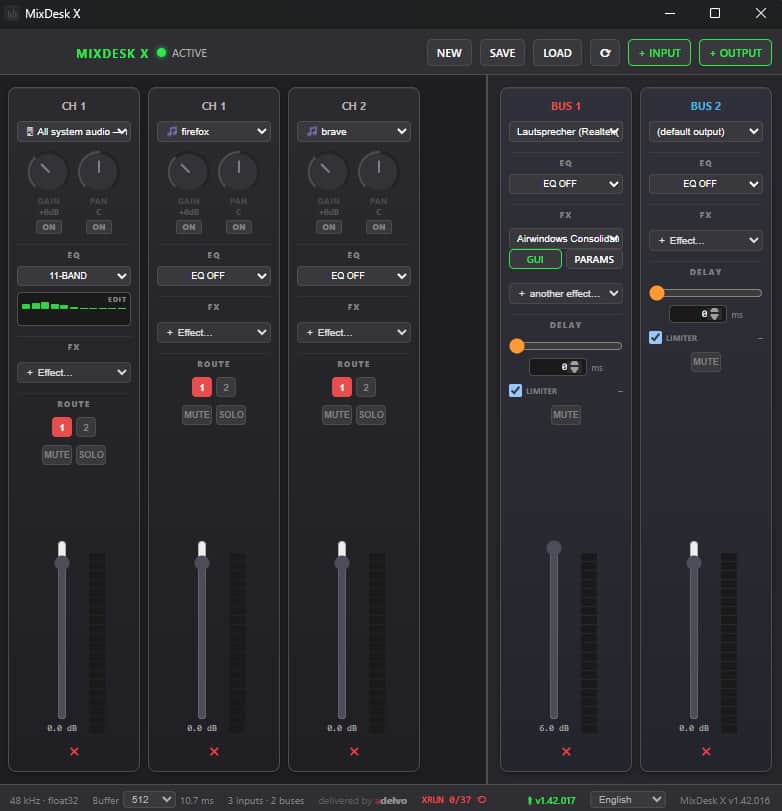
I run a side project building tools for live audio and video production (you may have seen my Directors Plan for vMix post). MixDesk X is the free one: a real mixing console for everything your computer plays and records.
The problem: computer audio is scattered across single-purpose tools — one app for per-app volumes, one for EQ, one for routing into OBS, one for Bluetooth delay. Each adds its own driver or virtual cable to the signal path, whether you need it or not.
MixDesk X does all of it in one mixer — and only what you actually enable sits in the signal path. Because everything runs in one engine, it covers several audio jobs at the same time: per-app volumes while streaming, EQ'd speakers plus delay-compensated Bluetooth headphones, effect chains on your mic, a clean recording bus — simultaneously.
What's inside:
CAPTURE — cable-free - System & per-app capture without any drivers: ScreenCaptureKit on macOS, WASAPI Process Loopback on Windows. Spotify, your browser and Discord each land on their own channel strip - Device inputs: mics, USB interfaces, webcam audio, line-in — anything the OS sees
MIX - Up to 4 stereo output buses — e.g. headphones, speakers, stream feed and a recording bus, each with its own mix - 2/3/11-band EQ on every input and every output - Per-bus delay (0–1000 ms) — finally lip-sync for Bluetooth speakers - Safety limiterwith gain-reduction metering on each bus - 48 kHz float32 engine, buffers 128–2048, automatic stream recovery when devices drop
EFFECTS - CLAP plugin host: effect chains with native plugin GUIs — chains and settings are saved and restored with your setup - ~400 free effects from a single plugin: the Airwindows Consolidated pack, one-click install from inside the app
THE LAST MILE - Capturing never needs drivers. Only if you want to route your finished mix INTO an app (Discord, Zoom, OBS as a mic) do you need a virtual device — the app sets that up for you: a free multi-device BlackHole installer on macOS, VB-Cable on Windows. Optional, one click, clearly explained
Some backstory: the first version was macOS-only, and the response was lukewarm — even at free. But then the concept got copied. Twice. That told me more than the download numbers did: the idea was right, the execution window was still open — the copies didn't follow through. So I rebuilt it in Go for both platforms, and now it's the free anchor of my lineup (together with Volume Balance, which also went free): the products people meet before they meet my paid vMix tooling (Directors Plan).
Completely free — no Pro tier, no account, everything included.
macOS (Apple Silicon) and Windows 10/11 (x64 & ARM64). Downloads on GitHub.

3 Comments
I'm curious what rebuilding taught you that the first launch didn't. Was there anything about how people evaluated MixDesk X that challenged one of your original assumptions about what they actually cared about?
Thanks — good question.
Honestly, the rebuild didn't start as a strategy. My daughter was using an ASIO-based utility to put an EQ on her mic — clunky GUI, and it kept crashing and causing problems. I wanted to give her something that just stayed up, and I wanted it on Windows, so I rebuilt the whole thing in Go to go cross-platform. The first version had been macOS-only and paid; at that point I figured — so what, give it away for free.
Then, like Directors Plan for vMix, it ran a bit past its original scope. It's basically become a software version of the dbx DriveRack — the loudspeaker-management box I used to lean on as a Swiss-army knife back in my messy fixed-install days. That's where the presets, effects and the measurement side come from: Linkwitz-Riley crossovers, pink-noise room measurement, auto delay alignment, a full effects chain — it has to cover Mac and PC setups that can be wildly different. In practice it now replaces a rack of hardware.
Short version: I built it wider for a very practical reason — a crash-prone tool my kid was stuck with — gave it away, and let it grow into the rack I always wanted on a laptop.
And right now it's happening again: I'm building Adelvo Commander, an SFTP client with a local file manager and an AI renaming function — it started as nothing more than a replacement for the WinSCP I run under Wine on my Mac.