
p2p.gifts
Crypto Gifting Wizard | Instant Claim, No Signup, No Install
📉 What is disrupting your marketing airdrops?
📉 What is killing the conversion rate for your marketing giveaways?
⛔ Do not ask for a wallet address or an app install for your small airdrops, giveaways, or referral fees.
✅ Create a one-time envelope, put money in it, and give it as a whole.

On the internet, you connect with thousands of people every day. Sometimes you just want to say a quick thank you—giving a small gift to an active follower, an engaged community member, or a referral.
Or perhaps you just launched a fun new meme coin and want to airdrop a small amount to your followers to build excitement and reward your early supporters.
"Hey! Thanks for being so active in the community. Let me send you a $5 gift. What is your wallet address? Or your Coinbase account? Maybe Starbucks?"
"Sorry, I don't have those accounts. 😭"
This is where the friction begins. Payment fragmentation disrupts micro-gifting, kills conversion rates, and stalls the momentum of a great interaction.
p2p.gifts is a browser-based, peer-to-peer gifting wizard designed to eliminate this exact complexity. Neither the sender nor the receiver needs to download an app, register an account, or configure a wallet.
Gifting and claiming cryptocurrency with zero signups, downloads, installs, or even having to ask anything—that is the key point of this article.
The idea
To understand how p2p.gifts works behind the scenes, think of this simple MetaMask mental model:
Setup: You generate a temporary wallet in MetaMask and load it with funds.
Gift: Next, you create a gift card featuring a custom image, a personal gift note, and a QR code that encodes the seed phrase. Then you share the gift card.
Claim: Your recipient scans the QR code, imports the seed phrase into MetaMask, and withdraws the funds to their personal wallet.
While this path sounds clear, it is also highly tedious. p2p.gifts keeps this exact same framework but packages it into a seamless, automated experience powered by mybucks.online.
How to Create a Gift Card
This walkthrough shows you how to gift crypto through p2p.gifts, from opening the site to sharing a finished gift card with someone you care about.
Start Gifting
Open p2p.gifts in your browser. On the welcome screen you will see a sample gift card and a short introduction to the product. When you are ready to begin, click the Start Gifting button.

Step 1 — Review the Auto-Filled Passphrase and PIN
The first step of the wizard asks you to secure your gift wallet. The app generates a strong passphrase and PIN for you automatically, so you do not need to invent credentials or try to remember them for later. Review the values on the screen. If you prefer a different pair, tap the refresh icon next to either field to generate a new one. You can also type your own values, as long as they pass the strength meter shown below each field.
⚠️ Important: These credentials are for one-time use only. Once you share the gift card, anyone with the card or QR code can extract the credentials—so do not reuse private credentials you use for other accounts.
When you are satisfied, click Create Wallet. A short loading dialog will appear while the wallet is created in your browser. Please do not refresh or close the tab until you have downloaded your gift card, because these credentials exist only in this browser session.

Behind the loading dialog, a secure cryptographic process is running to create a one-time wallet account from your current credentials.
In the following steps, you will deposit cryptocurrency into this account, then embed the full account credentials in a QR code on a gift card with an image and a note.

Step 2 — Deposit Crypto into the Wallet
Next, fund the gift wallet. Choose a network from the dropdown, then send cryptocurrency to the address displayed on the screen. You can scan the QR code with a mobile wallet or copy the address and paste it into the wallet you normally use.
For your recipient’s convenience, include a little gas fee along with the other tokens—for example ETH or POL with Pepe, Bonk, or USDT/USDC—so they can withdraw the funds without friction.
💡 Pro-Tip: We recommend using Polygon, Base, or Monad networks, since gas fees there are very low. For example, on Polygon, you can deposit your gift amount in USDT or USDC along with just 0.003 POL to easily cover their withdrawal gas fee.
After your deposit is complete, click Proceed to continue.

Step 3 — Customize the Look and Write a Note
In the final step of the wizard, you design the gift card itself. Choose a card style that fits the occasion, and write a warm gift note in the text area. The note supports simple Markdown formatting if you want headings, bold text, or a bit of structure. As you edit, the live preview on the left updates so you can see how the card will look before you share it.
Besides a few prepared card styles, you can prepare your own card image and upload it for a special gift.
The QR code in the card preview encodes a URL of the form https://app.mybucks.online#wallet=<base64-encoding-of-passphrase-pin-and-active-network>.
p2p.gifts is a step-by-step gifting wizard, and technically it utilizes mybucks.online.

When the card design looks nice, share the gift card in whichever way is easiest. Use Download Image to save the full gift card as a PNG that you can send or print.

Use Download QR Code if you only need the QR code. You can insert this QR code into a personal email or anywhere else.

You can also use Copy Gifting Link to place the claim URL on your clipboard and paste it into a chat or email.
https://app.mybucks.online/#wallet=o9zYSPAhNXbTA0LWgrbnAteFMsSS11RmIkB3J1NWxlODAHcG9seWdvbgvBHguo
You can send the card by DM, email, or even print it and slip it into an ordinary greeting card.
How to Claim a Gift
When your friend receives the card, they scan the QR code or open the gifting link. Their browser opens app.mybucks.online, unlocks the same gift wallet, and lets them transfer the funds to an address they control. They do not need to create an account or install an app.
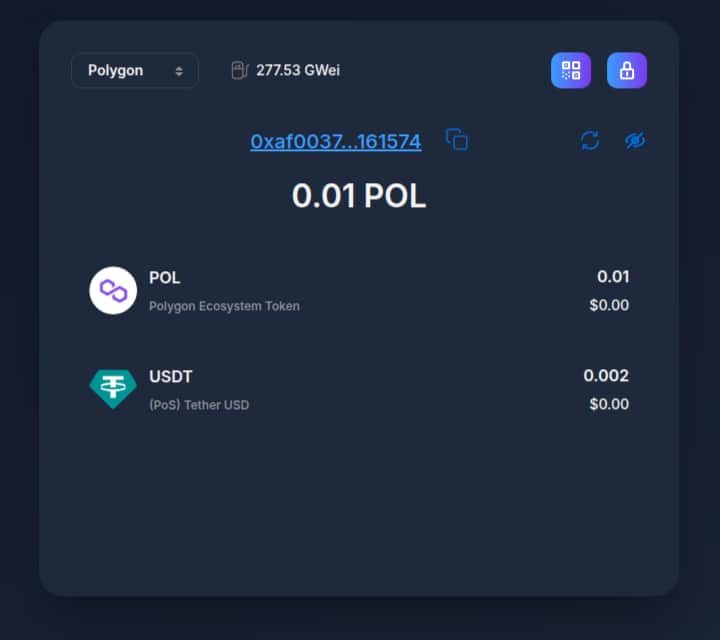
Treat the gift card like cash. Anyone who has the link or the QR code can claim the funds, so share it only with the person you intend to gift.
You may be concerned about leakage of the gift card, QR code, or claim URL through an ISP, email, or messaging platform. For that reason, we encourage using this platform for micro-gifting.
Attackers can try brute-force or dictionary attacks against your credentials. Key generation uses the Scrypt KDF to make that harder for attackers, and p2p.gifts also auto-fills a high-entropy, random passphrase and PIN. Human-chosen credentials are often weaker, so we do not recommend entering a passphrase and PIN manually.
Please try p2p.gifts and mybucks.online yourself, and review the documentation here.
The Dropbox Analogy
Dropbox won the market not because they invented cloud storage, but because they invented the public, shareable link. You clicked a link, and the file was right there. No account was required just to view it.
The Motivation & Architecture
I wanted to bring a similar impact to value transfer. Click a link, and the money reveals itself.
Think about how MetaMask and seed phrases work. Imagine you create a brand new wallet, deposit 5 USDC into it, and then send the seed phrase itself to a friend as a gift. Your friend would download a wallet, import the seed phrase, open that wallet, and withdraw the 5 USDC.
I wanted to automate this. To do it, I utilized a deterministic hash function—specifically, a Key Derivation Function (KDF)—to instantly convert credentials (like a seedphrase or password) into a wallet account on the client side.
By passing these credentials as a hash fragment or query parameter in a URL, the magic happens:
The Giver: Generates a temporary, one-time wallet, deposits the crypto, and shares the wallet itself via a URL (or embeds it in a beautifully designed QR code gift card).
The Receiver: Clicks the URL(or scan gift card's QR code). The app instantly runs the key generation in their browser, opens the exact same wallet, and gives them total freedom to withdraw the money to their own main wallet or an exchange. No signups, no extensions, no app installs.

(☝️This is a demo card and does not contain actual USDC!)
Real-World Use Cases
Imagine you just minted your own memecoin and want to airdrop it to 1,000 users. Instead of manually collecting 1,000 wallet addresses, you can simply generate 1,000 one-time claim URLs and distribute them via email.
Or picture running a marketing campaign or quest on X (Twitter) or Telegram: "Follow us, and claim your reward instantly." Instead of asking users to drop their addresses in the comments, you just drop the claim URL or show a QR code. That is all.
Think about how easy it is to put $10 in an envelope and give it to a friend. Why is doing the same with crypto so hard? Why do we have to ask for complex wallet addresses or force friends to set up seed phrases just to receive a gift?
I built p2p.gifts and mybucks.online to make crypto as easy as a physical gift card.
The Magic: Send the Wallet, Not Just the Coins
Imagine creating a one-time wallet in seconds, loading it with USDC or PEPE coins, and sending the entire wallet via a simple link on Telegram or WhatsApp. The recipient clicks the link and instantly takes full ownership.
No registration. No app installs. No seed phrase headaches.
Design Philosophy
mybucks.online is a seedless, disposable crypto wallet designed for speed, convenience, and decentralization. It does not require app installs, browser extensions, or seed phrases. It converts human-readable, traditional credentials into a wallet private key instantly using a one-way hash function in the browser.
mybucks.online is not intended to replace full-featured wallets such as MetaMask or Trust Wallet. It targets micro-transactions and URL-based gifting, and aims to foster a lightweight, accessible gifting culture in Web3.
Security Architecture
In mybucks.online, the passphrase and PIN are the primary credentials. It derives a private key from your passphrase and PIN using Scrypt and Keccak256. The Scrypt KDF was intentionally chosen to increase computational cost of key derivation and strengthen resistance to brute-force attacks.
Key derivation runs entirely in the browser — no storage, no third-party key-management APIs. There is no server, no storage, and no database. The wallet is generated and erased instantly.
1-Click Gifting: Wallet via URL
The passphrase, PIN, and active network ID are encoded into a URL hash fragment and shared. On the recipient side, the payload is parsed, key derivation runs automatically, and the wallet opens immediately.
There is no server-side link expiration — the derived on-chain address is fixed. For as long as funds remain at that address, they are accessible to anyone who holds the link.
This enables:
One-time starter wallets for gifting without requesting wallet addresses
Bulk distribution and massive airdrops through shareable links
🎨 p2p.gifts: The Visual Gifting Wizard
While mybucks.online acts as the underlying engine, p2p.gifts is the frontend wizard built entirely for a brilliant user experience.
From a UX perspective, it transforms a raw crypto link into a meaningful present:
Design: Create and customize a beautiful digital cover for your gift card.
Fund: Automatically generate and fund the underlying disposable wallet.
Share: The wizard embeds the gifting wallet as a clean QR code right onto your design.
You can then download the image or send it directly via email or Telegram. It bridges the gap between secure Web3 technology and the emotional, visual joy of giving a real gift.
-
1
so I hope to mention comparison it from other wallets like:
Fortress wallets vs disposable envelope
-
1
Eliminating the seed phrase headache and the need to ask for a complex address is exactly what crypto gifting needs to go mainstream. Treating a disposable wallet like a physical envelope makes the onboarding process so much more human and intuitive
-
1
Exactly! Frictionless UX and easy onboarding are the entire point here. I really hope this simple concept can make a meaningful impact on internet gifting culture.
-
-
1
The envelope analogy is strong, but I think the biggest challenge here is trust, not convenience.
“Send the wallet, not just the coins” is memorable, but the moment people realize anyone with the link can access the funds, the product needs very clear safety framing.
For gifting, the user does not only need to understand how easy it is. They need to understand when it is safe, when it is temporary, and what action the recipient should take after opening it.
If that trust layer is not obvious, people may like the idea but hesitate to use it with real money.
The sharper positioning might be less “seedless disposable wallet” and more “temporary crypto gift link for small amounts.”
-
1
I love this perspective, and you’re totally right that setting expectations is key. We lean heavily into familiar internet culture, as people already trust sharing private assets via unique URL links every day, like a view-only Dropbox link. When a recipient sees a QR code on a beautiful gift card, they intuitively know what to do without needing a manual.
To completely ease any security anxiety, we explicitly frame it as a "Digital Cash envelope for the Internet." Just like a physical paper envelope, nobody puts a million dollars inside—it is inherently meant for micro-gifting small amounts rather than storing your life savings. Though our underlying security mechanism is secure enough for big assets if you choose not to share via URL, we purposefully promote it for small, casual gifts.
It is 100% open-source and mathematically solid, and a one-month public cracking challenge on a honeypot wallet couldn't even break it. Your five-dollar gift card is perfectly safe, but framing it clearly as a temporary gift link is a great way to keep users completely relaxed.
I would appreciate it if you could cast your eye on p2p dot gifts for a minute and experience the power of the digital envelope and gift card firsthand!
-
1
That makes sense. The digital cash envelope frame is clearer than the technical wallet framing.
The bigger test is whether the page removes hesitation before someone puts real money into a link.
I can take a proper look and write a compact trust/positioning pass for p2p.gifts if useful.
Drop your email and I’ll send over the tighter scope. It’ll be easier to make useful in writing than turning this into a full site review here.
-
1
you can find the email address in our docs / about-us.
Thank you.
-
1
I checked but couldn’t easily find the right email.
Can you drop it here or send it to me directly?
I’ll keep it compact: a focused trust/conversion pass on where the page may create hesitation before someone funds a gift link, and what messaging would make the “digital cash envelope” idea feel safer for first-time users.
-
1
I'm curious whether you've had a chance to try the product yourself, as firsthand experience could be valuable in discussing its features.
If you have any specific feedback or questions, feel free to share them here.
-
-
-
-
-


Comment